
Datasheets, manuals and warranties — right there on the product page.
Attach the documents your buyers keep asking for to any product, category or CMS page. Store a file once and reuse it everywhere, decide who is allowed to download it and for how long, and see exactly what gets downloaded. Attaching files to products is free. Reuse, scoping, the secure-download suite, analytics and the API are Pro.
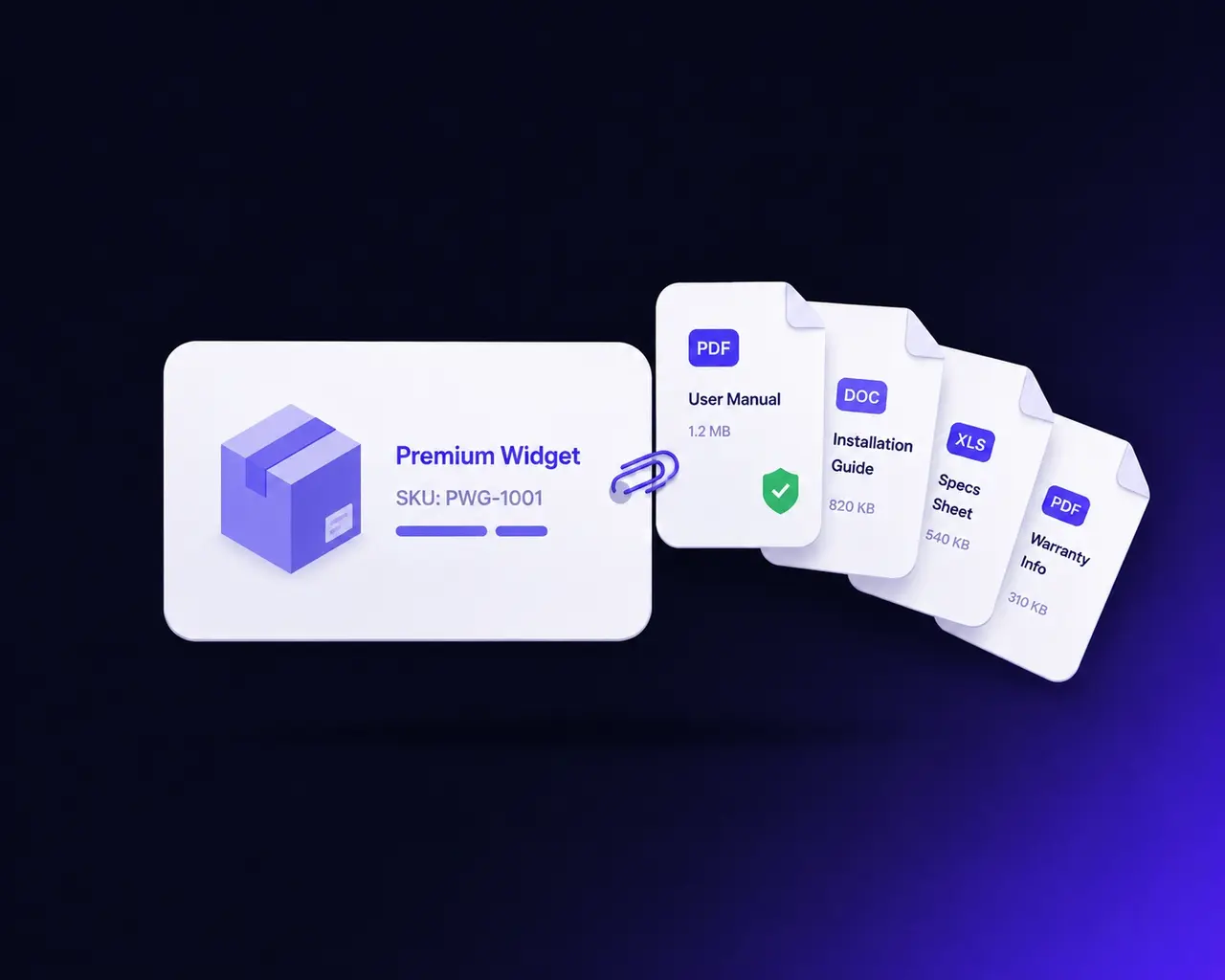
The documents exist. They’re just not where the buyer is.
Every considered purchase has paperwork behind it — a spec sheet, an installation guide, a compliance certificate, a size chart, a warranty. Magento gives you nowhere to put it. So it ends up somewhere else: a Dropbox link that rots, a media URL pasted into the description that anyone can share, or an inbox where the same “can you send me the manual?” email arrives every week.
Each workaround costs something specific. The pasted media URL is a file anyone can hotlink and you can never withdraw. The Dropbox link breaks the moment somebody reorganises a folder. The inbox answer is a person doing a job a page should do — and it never shows up in a report, so nobody can see how much of it is happening.
The fix is not “upload a file”. It is a document library your catalogue can point at: one stored copy, assigned wherever it belongs, with rules about who may take it and a record of who did.
Three things it does that a file upload does not.
Store the file once, use it everywhere
One installation manual can belong to forty products, a category and a support page at the same time. It is stored once and assigned as many times as you like, so updating the file updates it in every place at once — there are no copies to chase.
Decide who gets it, and for how long
Restrict a document to particular customer groups or store views, require a login, cap how many times one customer can download it, and give it an expiry date. Downloads are served by a controller, never as a raw media URL, so a shared link cannot outlive the rule.
See what actually gets downloaded
Every download is logged with the file, the customer, the page it came from and a hashed IP. That turns “we should probably put the manual up” into a number you can act on — and shows which documents are doing the selling.
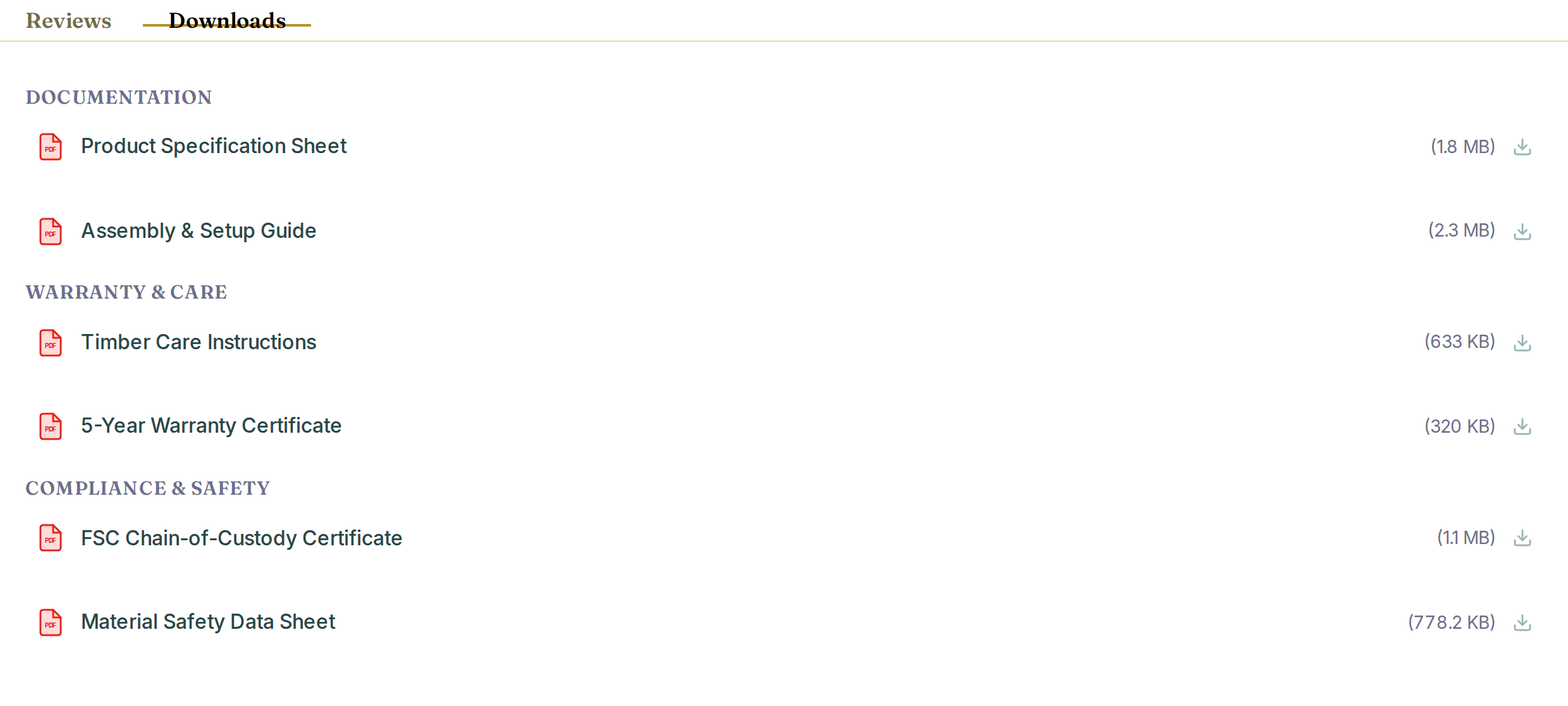
The documents show up where the buyer already is.
Attached files render on the product page as a tab or a content block — your choice, set once in configuration. Each row shows a file-type icon, the label you gave it and the file size, so a buyer knows what they are about to open before they click.
The template is static-first: it is real HTML that renders with JavaScript switched off, then layers Alpine on top where a theme provides it. That is why it looks the same on Luma, on Hyvä and on Lurox instead of needing a per-theme port.
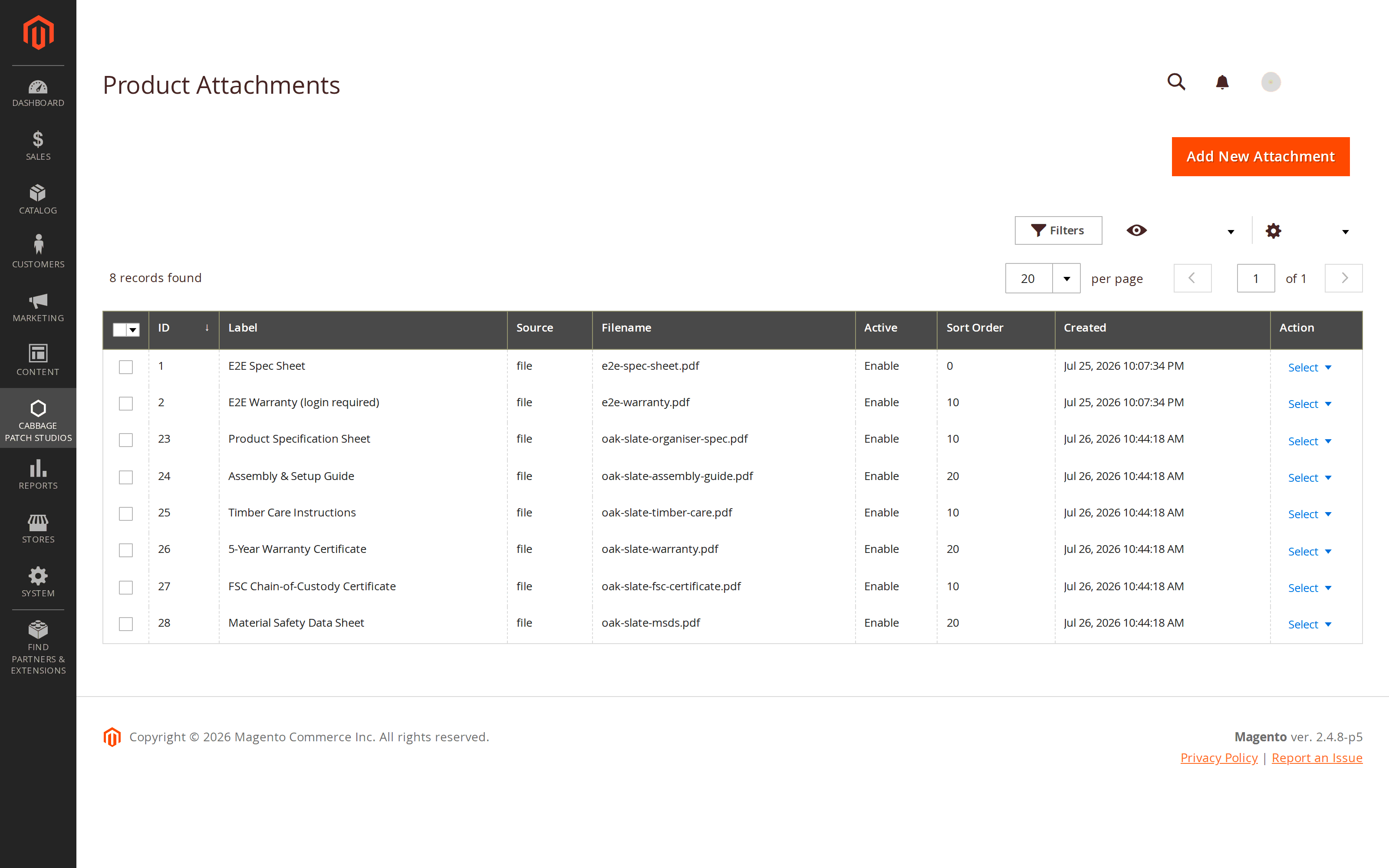
A file library, not a pile of per-product uploads.
Files live in their own grid with their label, type, size, group and status. From there a single file is assigned to as many products, categories and CMS pages as you need — the file is stored once and the assignments point at it.
That is the difference that shows up two years in. When the safety notice changes, you replace one file and every product carrying it is correct immediately. With per-product uploads you would be hunting duplicates.
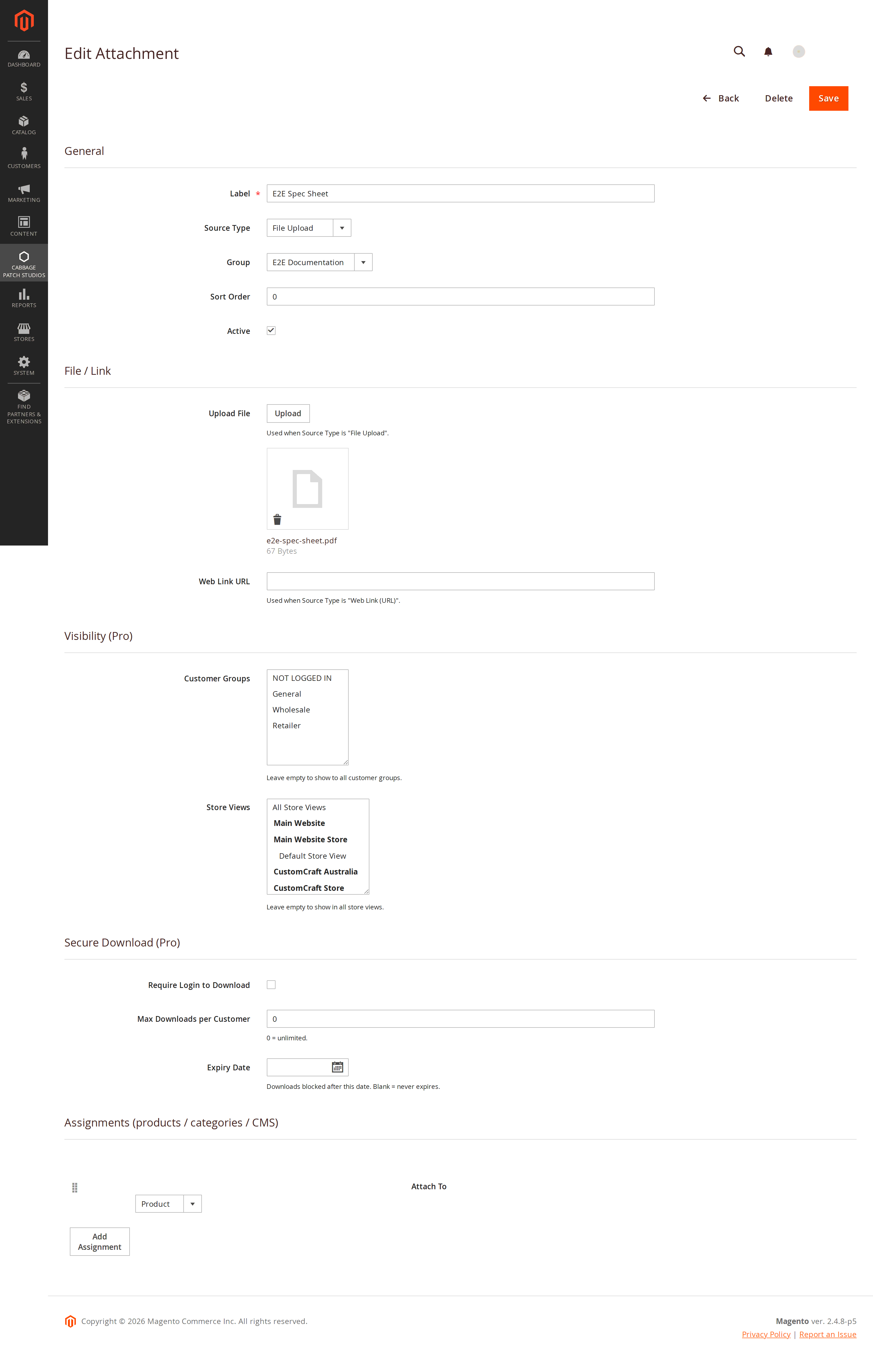
Who can download it, how often, and until when.
One screen carries the whole rule set for a document: which customer groups may see it, which store views it belongs to, whether a login is required, how many times a single customer may download it, and the date it stops being available.
The limits are enforced where it matters — in the download controller, against the log — not by hiding a link. A URL somebody saved last month still has to pass every check today. Per-customer limits, expiry dates and access logging as one bundle is rare, and where you do find it, it sits behind a licence you have to keep renewing.
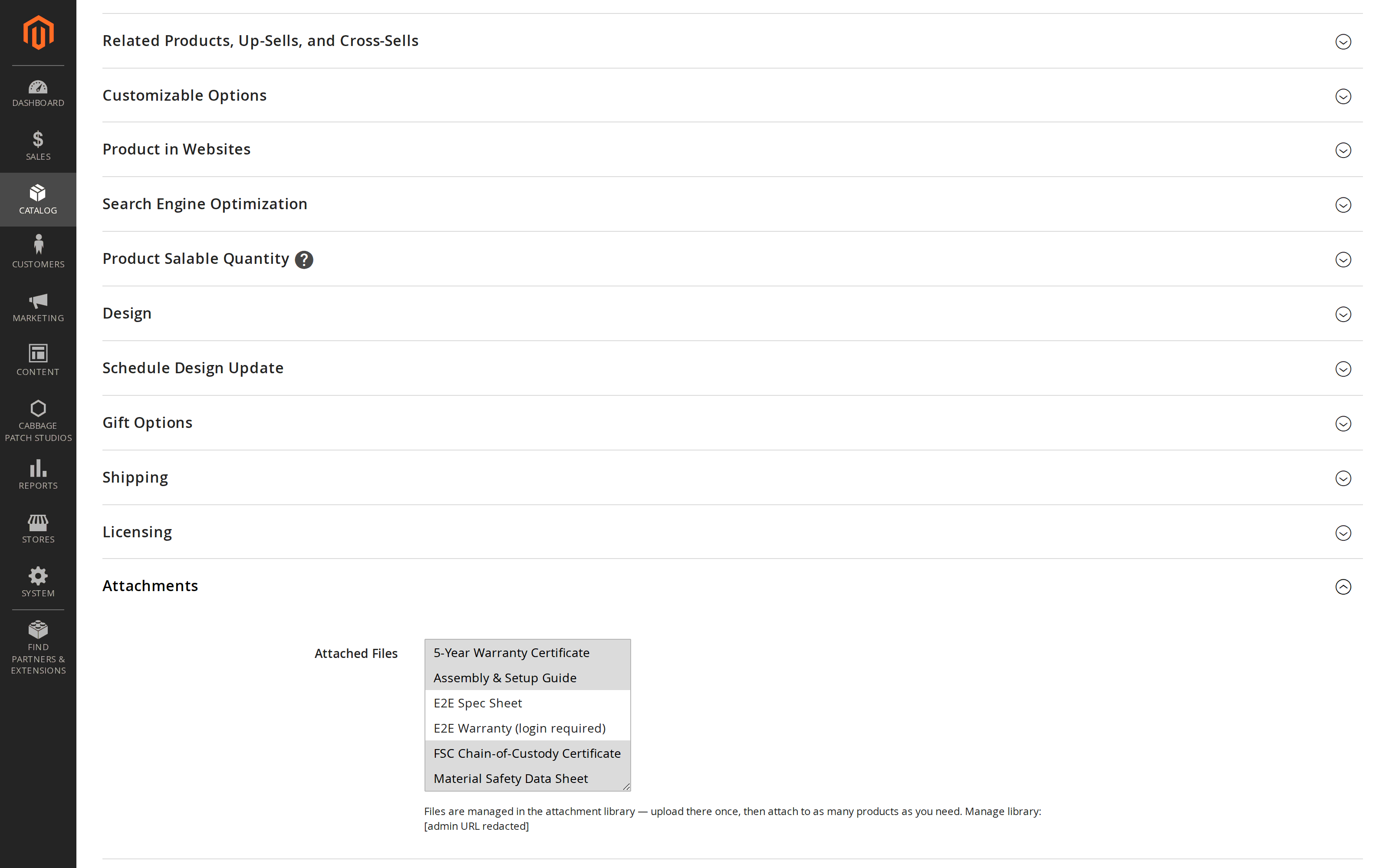
Attach a document without leaving the product.
Merchandisers work on the product edit page, so the attachment controls are on the product edit page — a section on the product form where you pick documents from the library, set their order and see what is already attached.
Nobody has to learn a second screen or remember where the library lives to add a datasheet to a new SKU.
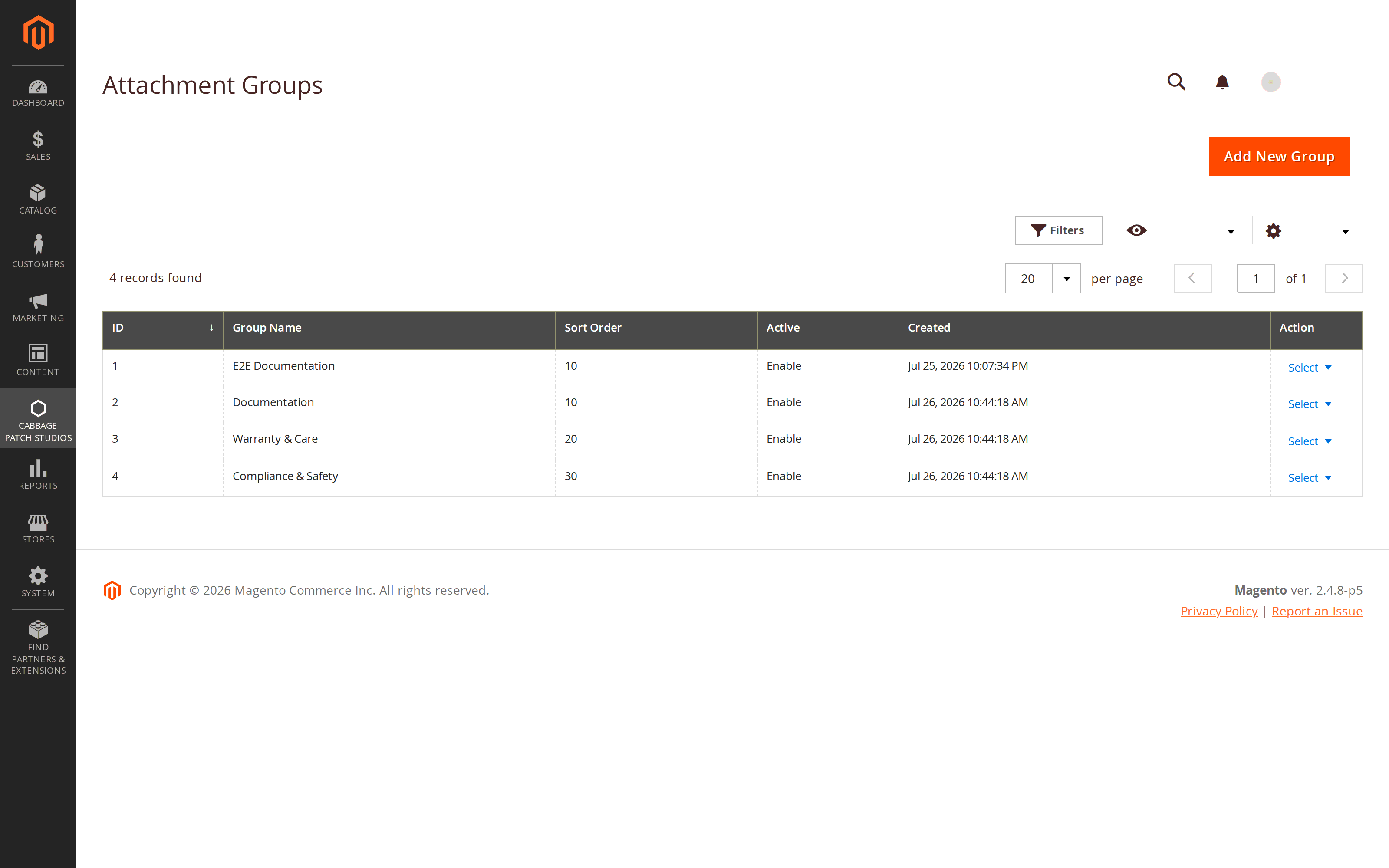
Ten documents, sorted into the sections a buyer expects.
Once a product carries more than a handful of files, a flat list stops helping. Groups let you sort documents into named sections — Manuals, Certificates, Safety — each with its own order and its own icon, so the storefront list arrives organised instead of alphabetical by accident.
Groups are managed in their own admin screen and apply wherever the files are shown.
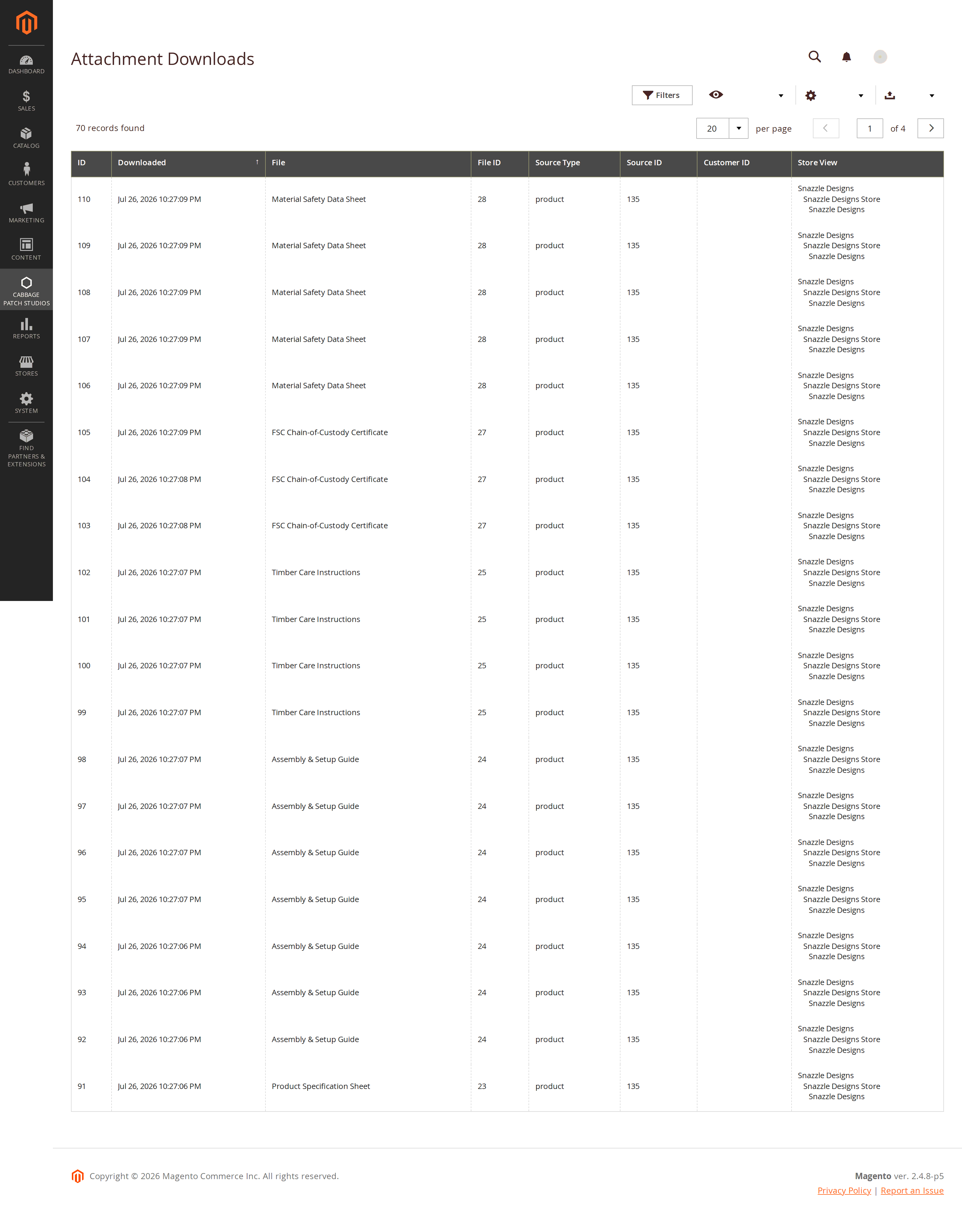
Which documents are doing the selling.
Every download is recorded: the file, the customer, the page it was requested from, and a SHA-256 hash of the IP rather than the address itself. The usage report turns that into something you can read — what gets taken, from where, and how often.
It is also the enforcement record. Per-customer download limits are counted against this log, so the report and the rules are the same data rather than two systems that can disagree.
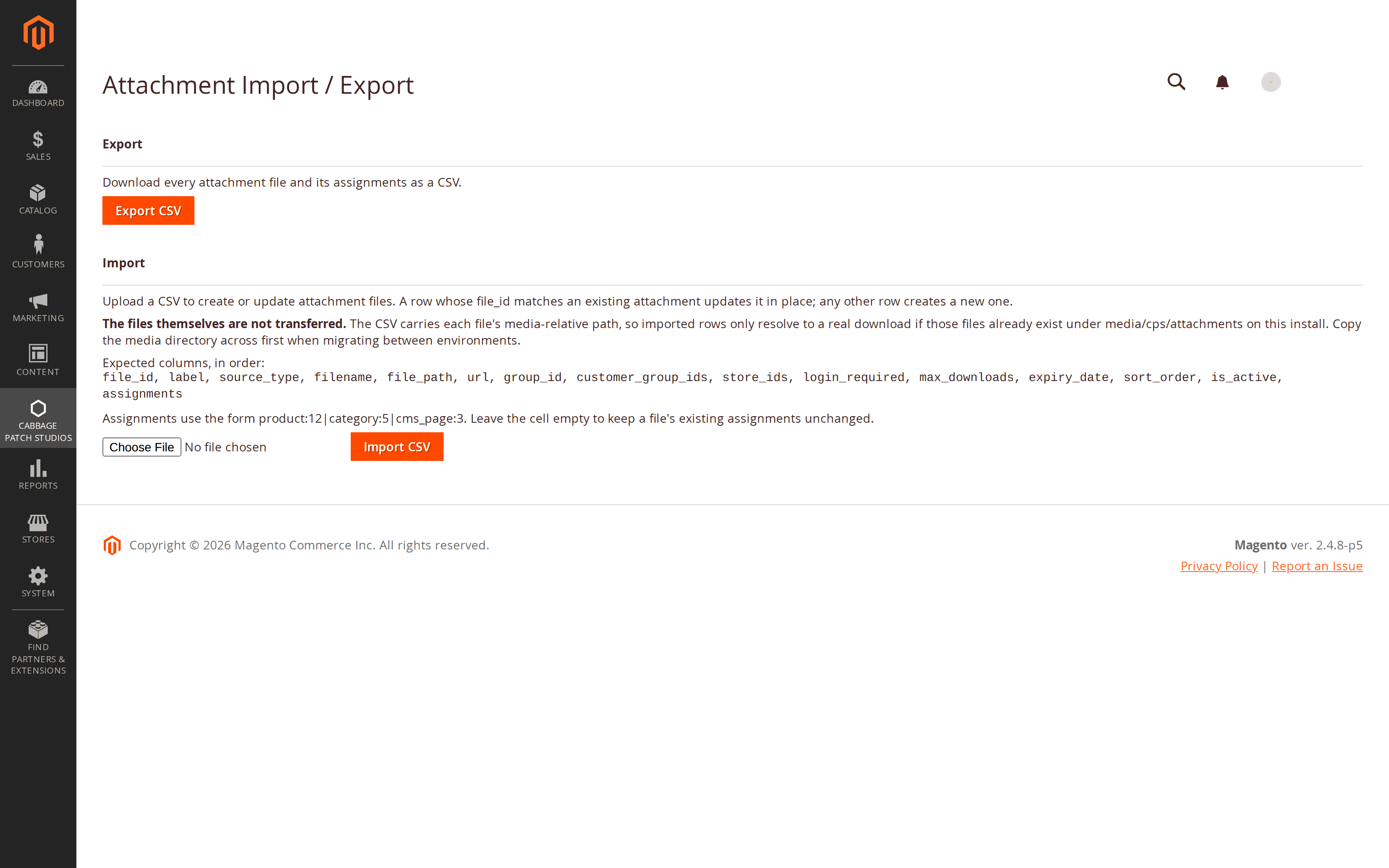
Six hundred datasheets, by CSV.
A catalogue with a document per SKU is not a job for a form. Import brings attachments and their assignments in from CSV and updates what is already there; export takes the current state back out — for a bulk edit in a spreadsheet, or to move a set of documents between environments.
This is the band that decides whether a large catalogue can adopt the module at all.
Every screen, from the storefront to the report.
How to attach a PDF to a product in Magento 2
- Upload the document once. In Content › Product Attachments › Files, add a file and give it the label a customer should see — “Installation manual (EN)”, not “manual-v3-final.pdf”.
- Assign it to the products that need it. Either from the file itself, or from the Product Attachments section on the product edit page.
- Choose how it appears. In Stores › Configuration › Content › Product Attachments, pick a Product Tab or a Content Block, set the tab label, and decide whether to show file sizes and type icons.
That is the whole free path. Reuse across categories and CMS pages, download rules and analytics are Pro, and none of them change these three steps.
How to show a datasheet on a category or CMS page
- Open the file in the Product Attachments library and add an assignment.
- Pick the target — a category, or a CMS page — instead of a product. The same stored file can hold assignments of all three kinds at once.
- Place it if you need it somewhere specific. The standalone widget drops the file list into any layout position or CMS block, so a buying-guide page can carry the same documents as the products it discusses.
Because the file is stored once, the category listing and every product using it stay in step — replace the file and all of them update together. Category and CMS assignment, and the widget, are Pro.
Why this one.
The secure set, as one bundle
Per-customer download limits, expiry dates and access logging together. The nearest comparable secure set costs $149 for year one and $90 every year after that; the $299 alternative does not bundle it at all. Ours is included, once.
A free tier that is not a trial
Attaching documents to products — icons, file sizes, tab or block, controller-served downloads — is free and stays free. Every paid rival in this category has no free tier; the free ones stop at attach-to-product with no support behind them.
Bought once, not rented
One-time licence per website with twelve months of updates. Others charge a yearly prolongation to keep updating, and a subscription lapse elsewhere can cost you the extension outright. Yours keeps working either way.
Your files stay on your server
No cloud storage, no third-party document service, no external SDK. Files sit in your Magento media directory and are served by a controller with a path-traversal guard — so nothing leaves your infrastructure and nothing can be hotlinked around the rules.
Free vs Pro
The free tier is the whole attach-to-product workflow, not a countdown. Pro adds reuse, control and measurement.
| Capability | Free | Pro — $299 |
|---|---|---|
| Attach files to products | ✔ | ✔ |
| File-type icons + file size | ✔ | ✔ |
| Product tab or content block | ✔ | ✔ |
| Controller-served downloads (never a raw media URL) | ✔ | ✔ |
| Admin file grid | ✔ | ✔ |
| Category & CMS-page attachments | — | ✔ |
| File reuse — one file, many assignments | — | ✔ |
| Customer-group visibility | — | ✔ |
| Store-view scoping | — | ✔ |
| Per-customer download limits + expiry dates | — | ✔ |
| Download analytics + access log | — | ✔ |
| Documents in the customer account | — | ✔ |
| Attach to order emails by status | — | ✔ |
| File groups | — | ✔ |
| Web-link (URL) attachments | — | ✔ |
| CSV import / export | — | ✔ |
| Standalone widget | — | ✔ |
| REST + GraphQL | — | ✔ |
If a Pro licence lapses, features that add capability switch off — but rules that restrict access stay enforced. A lapsed licence can never widen who can reach a document.
Pricing
30-day money-back guarantee · perpetual licence — the module keeps working after the update window ends.
Specifications
Platform
Magento 2.4.x Community Edition, PHP 8.4.
Themes
Luma, Hyvä, Lurox or any modern theme. Static-first markup — renders with JavaScript disabled.
File types
A configurable allow-list. Ships permitting PDF, DOC, DOCX, XLS, XLSX, ZIP, PNG and JPG; add whatever else you need.
File size
A configurable maximum, set to 10 MB out of the box.
Licensing
One licence per website. Perpetual, with 12 months of updates.
Integration
REST and GraphQL endpoints, a standalone widget, and CSV import/export (Pro).
Release history
Actively maintained — every entry maps to a real release.
Questions merchants actually ask
Yes. Attaching documents to products — with file-type icons, file sizes, your choice of a product tab or a content block, and downloads served securely by a controller — is free and stays free. It is not a trial and it does not expire. Reuse across categories and CMS pages, access rules, analytics and the API are Pro at $299 one-time.
Yes, on Pro. That is the point of the library: a file is stored once and assigned to as many products, categories and CMS pages as you like. Replace the file and every place it appears is updated at once — there are no per-product copies to track down.
To a real extent, yes. Downloads are never raw media URLs — they go through a controller that re-checks the rules on every request. On Pro you can require a login, limit a document to particular customer groups or store views, cap how many times one customer may download it, and give it an expiry date. A link somebody saved last month still has to pass all of those checks today.
Whichever you allow. The allow-list is a configuration field: it ships permitting PDF, DOC, DOCX, XLS, XLSX, ZIP, PNG and JPG, and you can add or remove types. There is also a maximum file size, set to 10 MB by default.
The same module. The storefront template is static-first — plain HTML that renders correctly with JavaScript switched off — and layers Alpine on top where the theme provides it. That means it works on Luma, Hyvä, Lurox and any other modern theme with no theme-specific build.
No. Pro includes CSV import and export for attachments and their assignments, so a large catalogue can be loaded in one pass and edited in a spreadsheet afterwards. Export also gives you a clean way to move a document set between staging and production.
No. It is a one-time licence per website with twelve months of updates. When the update window ends the module keeps working exactly as it is — renewing only puts you back on the latest version. That is deliberately different from others, who charge a yearly prolongation to keep the updates coming.
Need documents to behave a particular way in your store?
Out of the box the module attaches files to products, categories and CMS pages, reuses one file anywhere, controls who may download it and for how long, and reports on what gets taken. If you need something specific — a document set driven by a product attribute, a particular customer-group rule, or a bulk migration from wherever your files live now — tell us about your store and we will scope it, usually within one business day.
We build these on top of the Product Attachments module, so you keep the whole toolkit and add exactly what you need.
Put the manual where the buyer is looking.
Attach documents to products for free, and upgrade when you need one file in many places, rules about who downloads it, and a report of what they took. Self-hosted, static-first, and yours to keep. Pro is $299 one-time.
Buy Pro — $299