
Export your Magento order data anywhere — on a schedule, or the instant it happens.
Build a reusable export profile once — the record type, the format, the columns, the filters — then let Order Export deliver it to a file, an inbox, a webhook, SFTP, FTP or a Google Sheet. On a cron, or triggered live the moment an order is placed. It is the only Magento 2 order-export extension that ships a real free tier — not a 30-day trial.
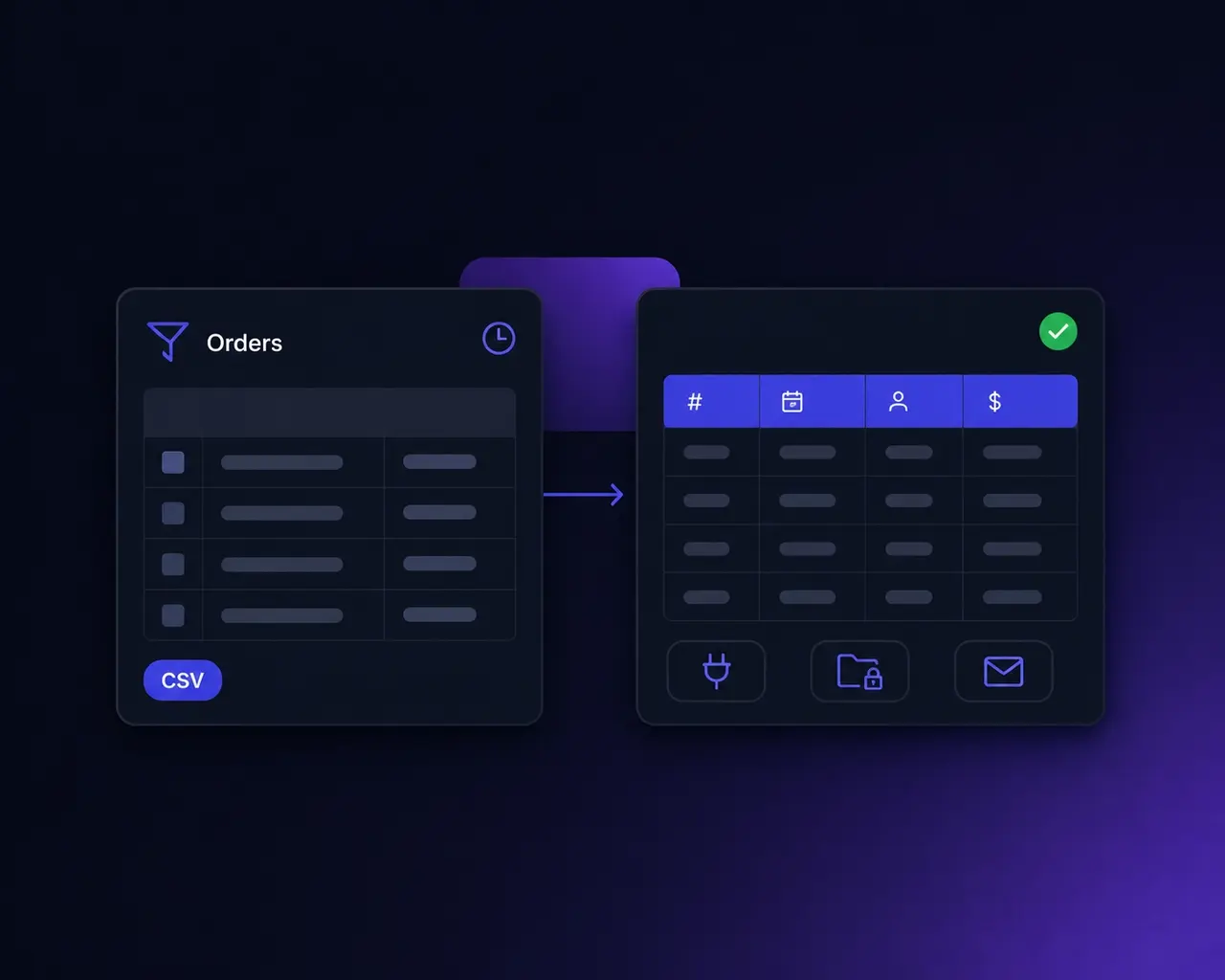
Order-data plumbing is the tax every growing store pays.
Your ERP wants a nightly CSV. Your 3PL wants shipment data by SFTP. Finance wants invoices in Excel. A partner's system wants a webhook the moment an order is placed. Magento gives you a sales grid and a CSV button — so the rest becomes a spreadsheet someone exports by hand every morning, or a “quick” custom script nobody wants to own.
This is the tool that removes it.
Configure the export once. Deliver it forever.
Reusable export profiles
Define an export once — record type, format, filters, and exactly which columns in what order, renamed to match the receiving system. Save it as a profile and run it forever. No re-picking fields every time, no brittle one-off script.
Deliver it anywhere
Local download and email on every plan; on Pro, push the same export to a webhook / REST endpoint, SFTP, FTP or a Google Sheet — destinations you add in the admin. One failing destination never aborts the batch.
On a schedule, or the instant it happens
Run profiles on a cron (Pro), or fire an export the moment an order is placed, invoiced, shipped or credit-memoed. Turn on incremental mode and each run carries only what is new since the last clean run.
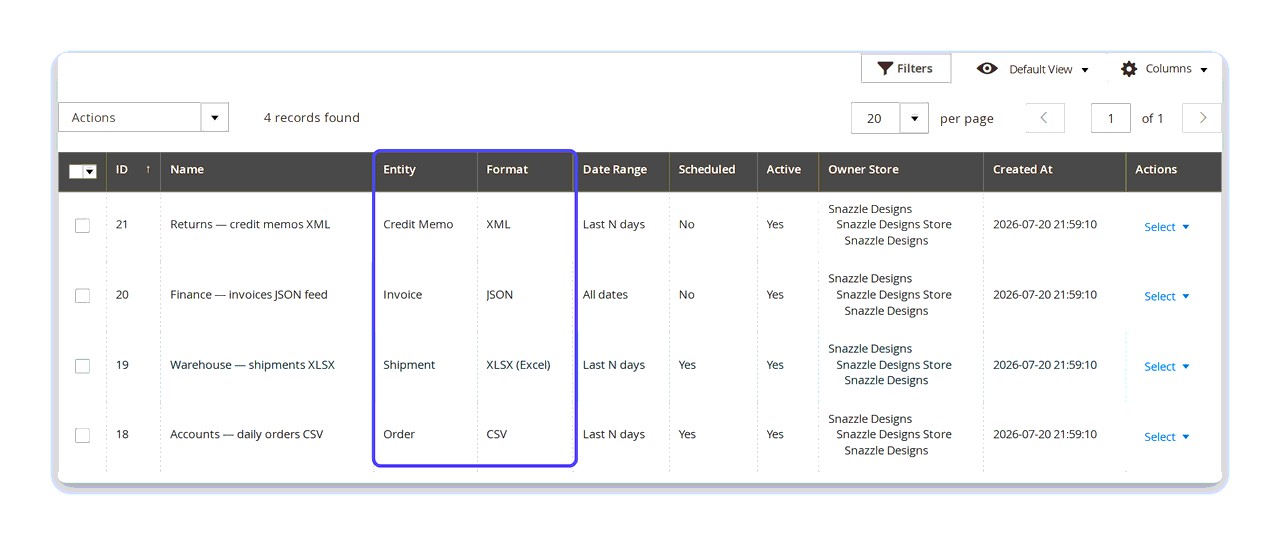
One profile per integration — configured, not coded.
Everything about an export lives on the profile: the record type, the output format, the filters, and the field map. Set it up once and run it forever — the Free tier keeps one profile, Pro keeps as many as you need. One per integration, per partner, per department.
- Orders on Free; invoices, shipments and credit memos on Pro.
- Each profile carries its own entity, format, date range and schedule.
- Scoped to a store view, or global across every store.
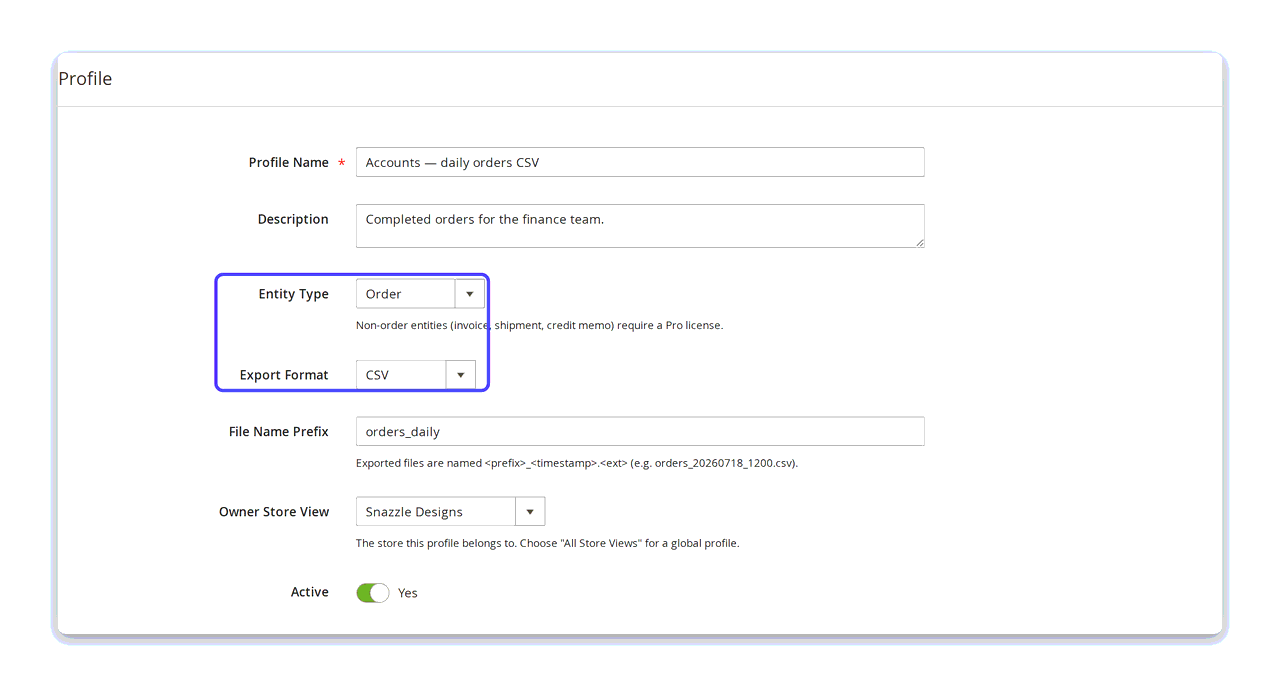
Five formats, from a nightly CSV to a dependency-free XLSX.
Pick the record type and the output format on the profile itself. CSV and XML are free. Pro adds JSON, TSV and XLSX — and the XLSX writer is dependency-free SpreadsheetML, so there is no PhpSpreadsheet or Spout to install and the file opens straight in Excel.
- Free: CSV, XML. Pro: adds JSON, TSV, XLSX.
- Exported files are named from your own prefix and a timestamp.
- Every format honours the same field map — rename once, exported everywhere.
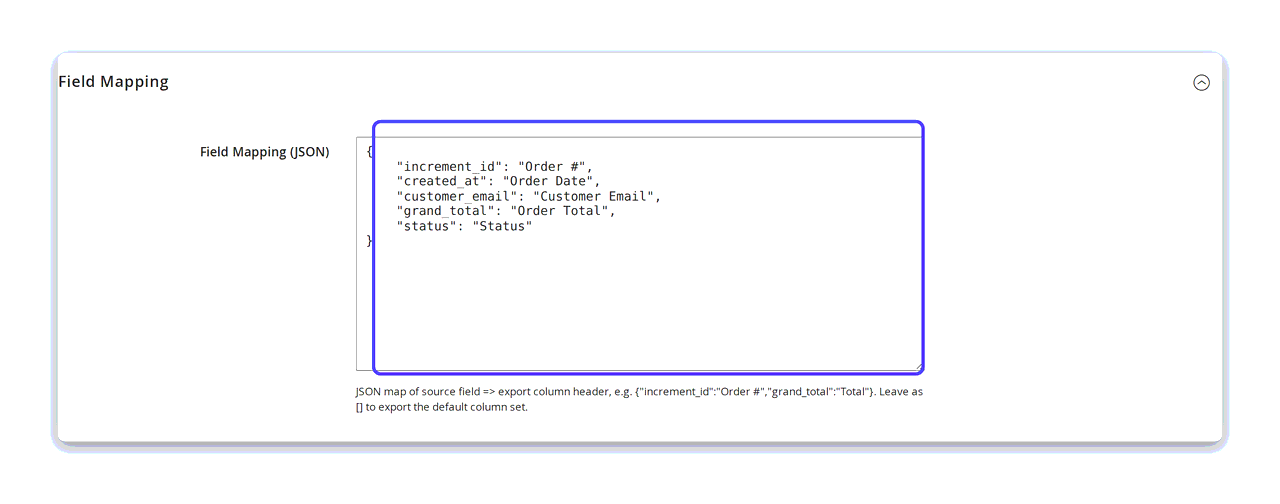
Column names that match the system receiving them.
The receiving system rarely wants Magento's raw column names. A profile carries a field map — a small JSON object pairing each source field with the column header you want — so increment_id arrives as Order # and grand_total as Order Total. Select the fields, rename them, and set their order.
- Pick which columns are exported — and in which order.
- Rename any column to match the target system's expected header.
- Leave it empty to export the default column set.
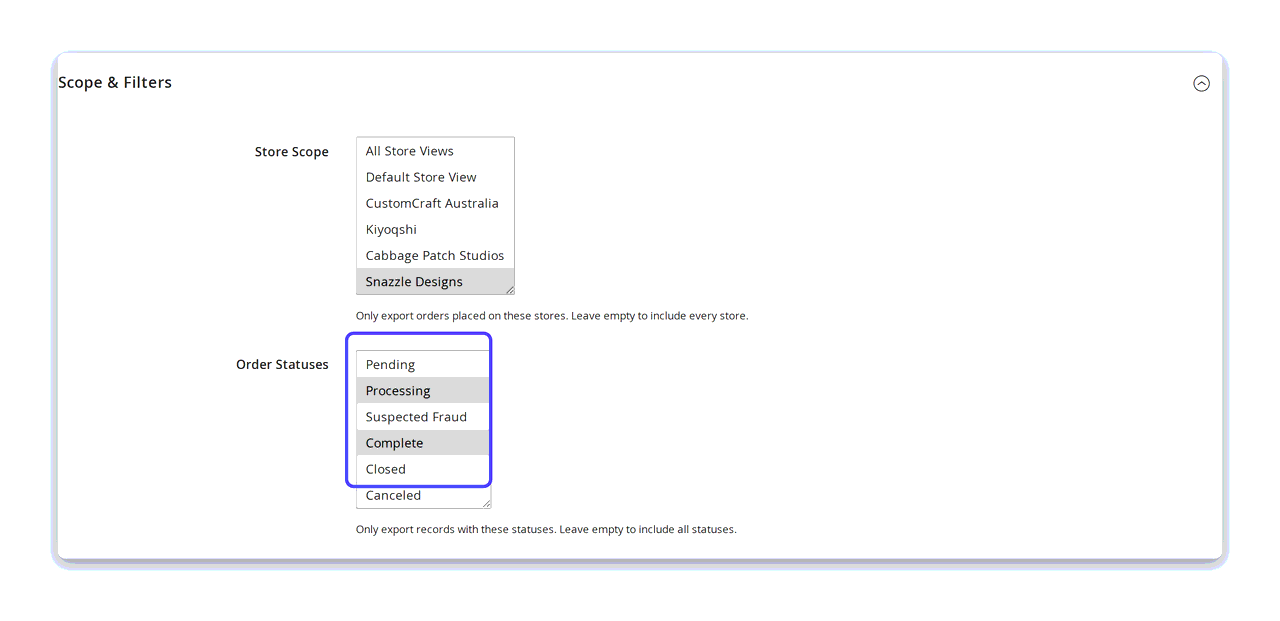
Filter it down before it ever leaves Magento.
Export the records you actually want. Scope a profile to one store view or every store, keep it to the order statuses that matter, and bound it by date — all dates, the last N days, or a custom range. Filters are on the free tier, not held back for Pro.
- Store scope: any combination of store views, or leave empty for all.
- Order statuses: leave empty to include every status.
- Date range: all dates, last N days, or an explicit from/to.
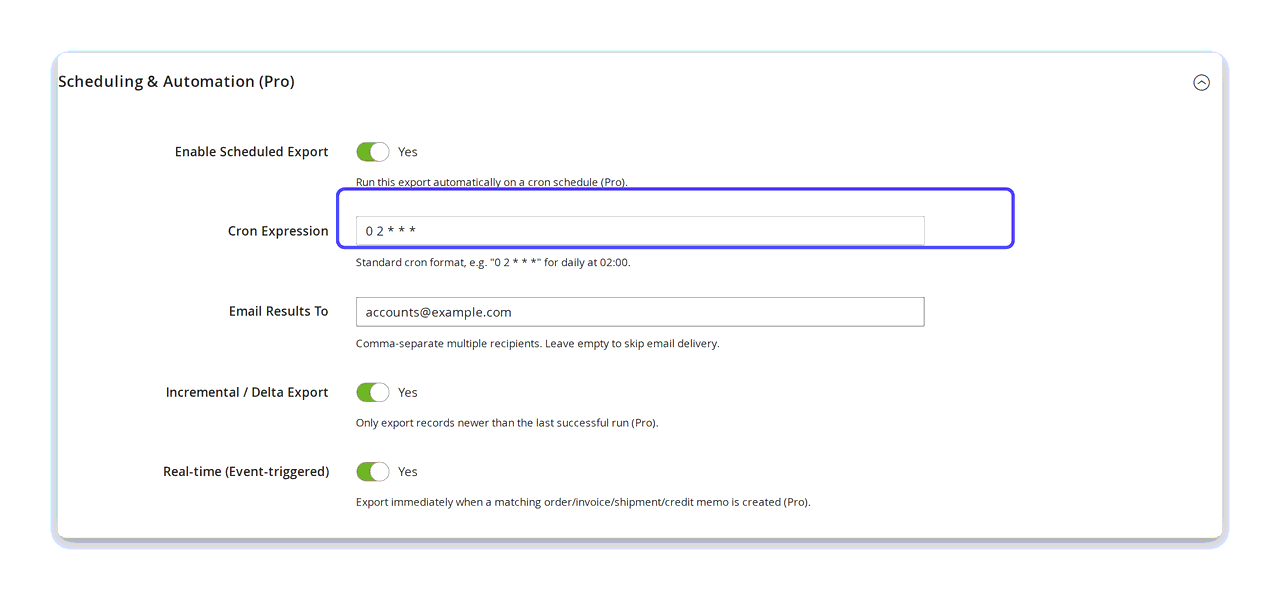
Set it once. It runs without you.
On Pro, a profile runs itself. Give it a cron expression and it goes out nightly at 02:00 — or turn on real-time and it fires the instant a matching order, invoice, shipment or credit memo is created. Incremental mode carries only the records that are new since the last successful run, so a nightly feed never re-sends yesterday.
- Standard cron expressions —
0 2 * * *for daily at 02:00. - Real-time, event-triggered export on order, invoice, shipment or credit memo.
- Incremental / delta: only what is new since the last clean run.
- Email the results to your team as each run completes.
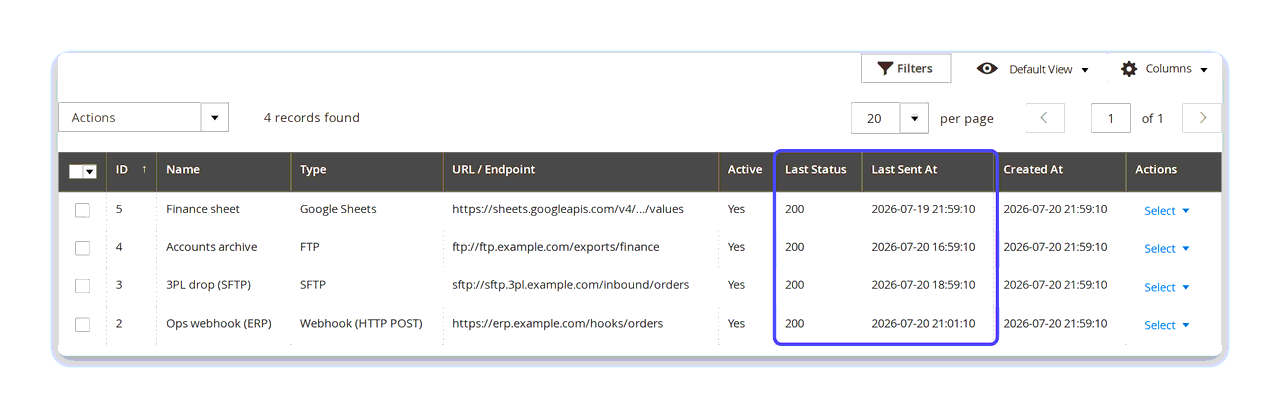
Webhooks and Google Sheets as first-class citizens — not "custom code".
This is where Order Export pulls ahead of the incumbents. Where older tools treat modern destinations as a bolt-on you pay a developer to wire up, here a webhook / REST endpoint, an SFTP or FTP server, or a Google Sheet is a destination you add in the admin — and it starts receiving your exports straight away.
- Paste a URL, and every export goes there — no developer, no ticket. Or send each one somewhere different — invoices to accounting's SFTP, orders to your 3PL's webhook — with Deliver For Profile.
- Custom headers and an authorization header for webhook endpoints.
- One bad target never aborts the run: each destination succeeds or fails on its own, and the last status and time are recorded against it.
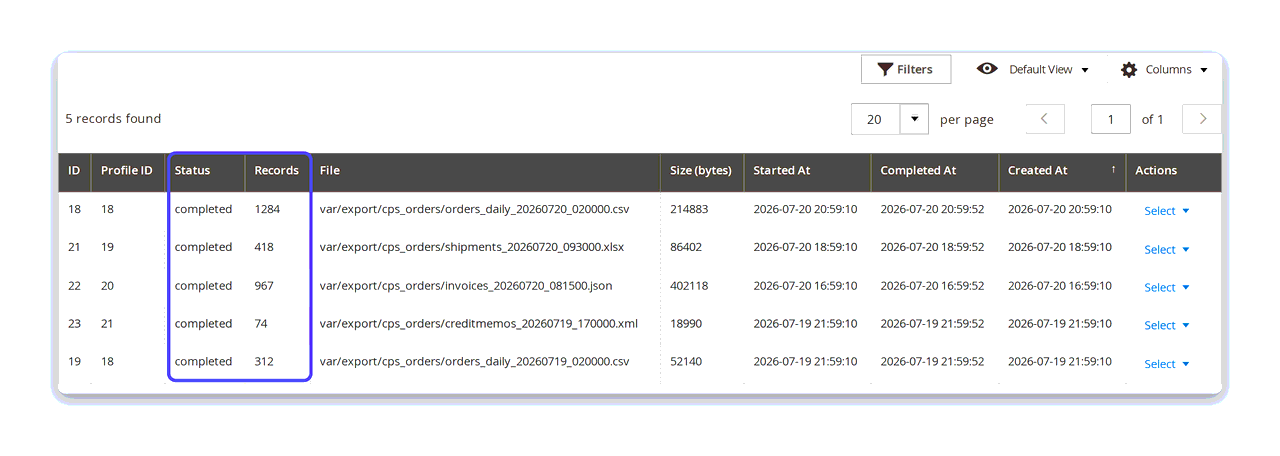
Proof that last night's export actually ran.
Every run — scheduled, triggered or manual — is written to the export history log: status, record count, the file it produced, its size and the timings. When finance asks whether last night's export went out, the answer is on screen rather than in a guess.
- Status and record count for every run.
- The exact file produced, with its size and start/finish times.
- Errors recorded against the run that produced them.
The whole module, screen by screen.
How to export Magento 2 orders to CSV
- Go to Sales → Order Export → Export Profiles and add a profile.
- Name it, set Entity Type to Order and Export Format to CSV.
- Under Scope & Filters, choose the store views, order statuses and date range you want.
- Optionally add a Field Mapping JSON map to rename the columns.
- Save, then run the profile — the file lands in your export directory and the run is logged in Export History.
Everything in this walkthrough is on the free tier. Read the full guide →
How to schedule an automatic order export in Magento 2
- Open the profile you want to automate and expand Scheduling & Automation (Pro).
- Set Enable Scheduled Export to Yes.
- Enter a standard cron expression —
0 2 * * *runs it nightly at 02:00. - Add recipients under Email Results To if the file should be emailed as it completes.
- Turn on Incremental / Delta Export so each run carries only what is new.
Scheduling, incremental runs and real-time triggers are Pro features.
How to send Magento 2 order data to a webhook
- Go to Sales → Order Export → Destinations and add a destination.
- Set Type to Webhook (HTTP POST) and paste your endpoint URL.
- Add an Authorization Header or custom headers if your endpoint needs them.
- Leave Deliver For Profile on All profiles (global) to receive every export, or pick a single profile to narrow it.
- Save with Active set to Yes. The grid records the last status and time for each delivery.
Delivery to webhook, SFTP, FTP and Google Sheets is a Pro feature. SFTP and FTP use password authentication in this release.
The difference it makes
An honest before and after — not a testimonial we cannot yet earn.
Without Order Export
- Someone exports a CSV by hand from the sales grid every morning.
- Modern destinations mean a custom script somebody has to maintain.
- No record of what was exported, or whether last night's job ran.
- Every new format or integration is another licence — or another script.
With Order Export
- Reusable profiles run themselves — on a schedule or the instant an order lands.
- Webhook, SFTP, FTP and Google Sheets are destinations you add in the admin.
- Every run is logged, with counts, file size, timing and errors.
- Five formats and four record types in one module — and a free tier to start on.
Why merchants choose Order Export
A real free tier — the only one in the category
Xtento, Amasty, Wyomind and Mageplaza are all paid-only. Order Export exports orders to CSV or XML, with filters and field mapping, free — forever.
Own it, don't rent it
A perpetual licence per website plus an updates renewal — not an annual subscription that switches your exports off when the invoice lapses.
Modern destinations built in
Webhook/REST and Google Sheets are first-class destinations you add in the admin, not "custom code" the incumbents charge a developer to wire up.
Real-time, not just nightly
Event-triggered export fires the moment an order is placed, invoiced, shipped or credit-memoed. Most rivals only schedule.
Self-hosted and theme-agnostic
A backend module with no storefront footprint. Runs on Luma, Hyvä, Lurox or any theme, and your order data never leaves your store.
Built to the same standard as the rest of the family
Static-first, PHP 8.4, Magento 2.4.8+, and covered by an automated test suite that exercises the real admin flow — not just unit mocks.
Free, or Pro at $229
| Free | Pro — $229 | |
|---|---|---|
| Record types | Orders | Orders + invoices, shipments, credit memos |
| Formats | CSV, XML | CSV, XML + JSON, TSV, XLSX |
| Export profiles | 1 | Unlimited |
| Filters — status / store / date | Yes | Yes |
| Field mapping — select, rename, reorder | Yes | Yes |
| Export history log | Yes | Yes |
| Manual (on-demand) export | Yes | Yes |
| Local file download | Yes | Yes |
| Cron scheduling | — | Yes |
| Event-triggered real-time export | — | Yes |
| Incremental / delta runs | — | Yes |
| Email delivery | — | Yes |
| Webhook / REST, SFTP, FTP, Google Sheets | — | Yes |
Perpetual licence + updates · Licensed per website (one domain per key) · 30-day money-back guarantee · Self-hosted — no export SaaS.
S3 delivery, SFTP key-based authentication and an admin template editor are on the roadmap for a future release.
Specifications
Platform
Magento 2.4.8+ (Community & Adobe Commerce) · PHP 8.4
Type
Backend module — admin UI only, no storefront footprint
Themes
Luma · Hyvä · Lurox (and any theme) — static-first, no Alpine dependency
Record types
Orders, invoices, shipments, credit memos
Formats
CSV, XML, JSON, TSV, XLSX (dependency-free SpreadsheetML)
Destinations
Local download, email, webhook/REST, SFTP, FTP, Google Sheets
Licensing
Per website (one domain per key) — perpetual, plus updates
Admin location
Sales → Order Export (Profiles · History · Destinations); Stores → Configuration → CPS
Release history
Actively maintained — every entry maps to a real release.
Added: Deliver For Profile on the destination form — a destination receives every profile's export by default, or just one profile's when you choose it.
Fixed: corrected plan labelling on the field-mapping screen.
Questions, answered.
It is genuinely free, forever — there is no trial clock. You can export orders to CSV or XML, apply status, store and date filters, map and rename columns, keep one profile and download the file locally. Every rival in this category is paid-only.
Invoices, shipments and credit memos; JSON, TSV and XLSX formats; unlimited profiles; cron scheduling and real-time event-triggered exports; incremental / delta runs; and delivery to email, webhook/REST, SFTP, FTP and Google Sheets.
Yes — on Pro, both are destinations you add in the admin, alongside SFTP and FTP. A webhook needs nothing more than the endpoint URL, plus an authorization or custom header if your endpoint requires one. SFTP, FTP and Google Sheets take their connection settings as a small JSON object on the destination.
Scheduled runs on a cron at your interval — for example 0 2 * * * for nightly at 02:00. Real-time fires the instant an order is placed, invoiced, shipped or credit-memoed. You can use either, or both, per profile. Both are Pro.
Yes. It is a backend module with no storefront output, so it runs identically on Luma, Hyvä, Lurox or any other theme. It is self-hosted, so your order data never leaves your store.
No. It is a perpetual licence per website (one domain per key), plus an updates renewal. Your exports do not stop if you choose not to renew — you simply stop receiving new versions.
Need a bespoke export?
Order Export covers the usual integrations out of the box — a nightly CSV to an ERP, shipments by SFTP, invoices as XLSX, a webhook the moment an order lands.
If your receiving system wants something stranger, tell us about it. We build these on top of Order Export, so you keep the profiles, the scheduling and the history log.
Stop exporting order data by hand.
Build one profile, deliver it anywhere, on a schedule or in real time. Start on the free tier — the only one in the category — and upgrade when you need the destinations.
Buy Pro — $229