

Order Export User Guide
Reusable export profiles for orders and every sales document, in every format, delivered wherever you need them — on demand, on a schedule, or the moment an order lands.
What the Order Export module does
Order Export turns your Magento sales data into files — on demand or automatically — and sends them wherever you need them. You build reusable export profiles that say what to export (orders, and on Pro also invoices, shipments and credit memos), in which format, filtered how, with the exact columns you want, then run them by hand, on a schedule, or the moment an order is placed.
It’s freemium, and the only module in its category (Xtento, Amasty, Wyomind) that ships a genuine free tier. The Free tier exports orders to CSV and XML, on demand, with status/date/store filters, column field mapping, one saved profile, an export history log, and a local file download. Pro ($229, per website) unlocks every format, every sales entity, cron scheduling, real-time event-triggered exports, incremental/delta runs, unlimited profiles, and delivery to email, webhook/REST, SFTP, FTP and Google Sheets.
Getting started
Order Export is a backend module — there is nothing to place on your storefront. Once it’s installed and enabled, everything lives in the Magento admin.
Enable the module
Go to Stores → Configuration → CPS → Sales: Order Export and turn it on. From the same screen you set the store-wide defaults:
- Export directory — where generated files are written on the server.
- Max records per file — caps the size of any single export file.
- Retention days — how long export history and generated files are kept before the cleanup job removes them (see Export History).
- Format options — CSV delimiter/enclosure, XML root element, and the sender identity used for email delivery.
Entering your Pro licence key
The Free tier comes with its own free key, which registers your install rather than unlocking anything. To unlock Pro, enter your per-website licence key at Stores → Configuration → CPS → Licensing → CPS Order Export. Licensing is per website (one domain per key), set at website scope. Feature gating reads a cached licence response with a durable database fallback, so a cache flush never silently drops you to Free mid-run.
Creating an export profile
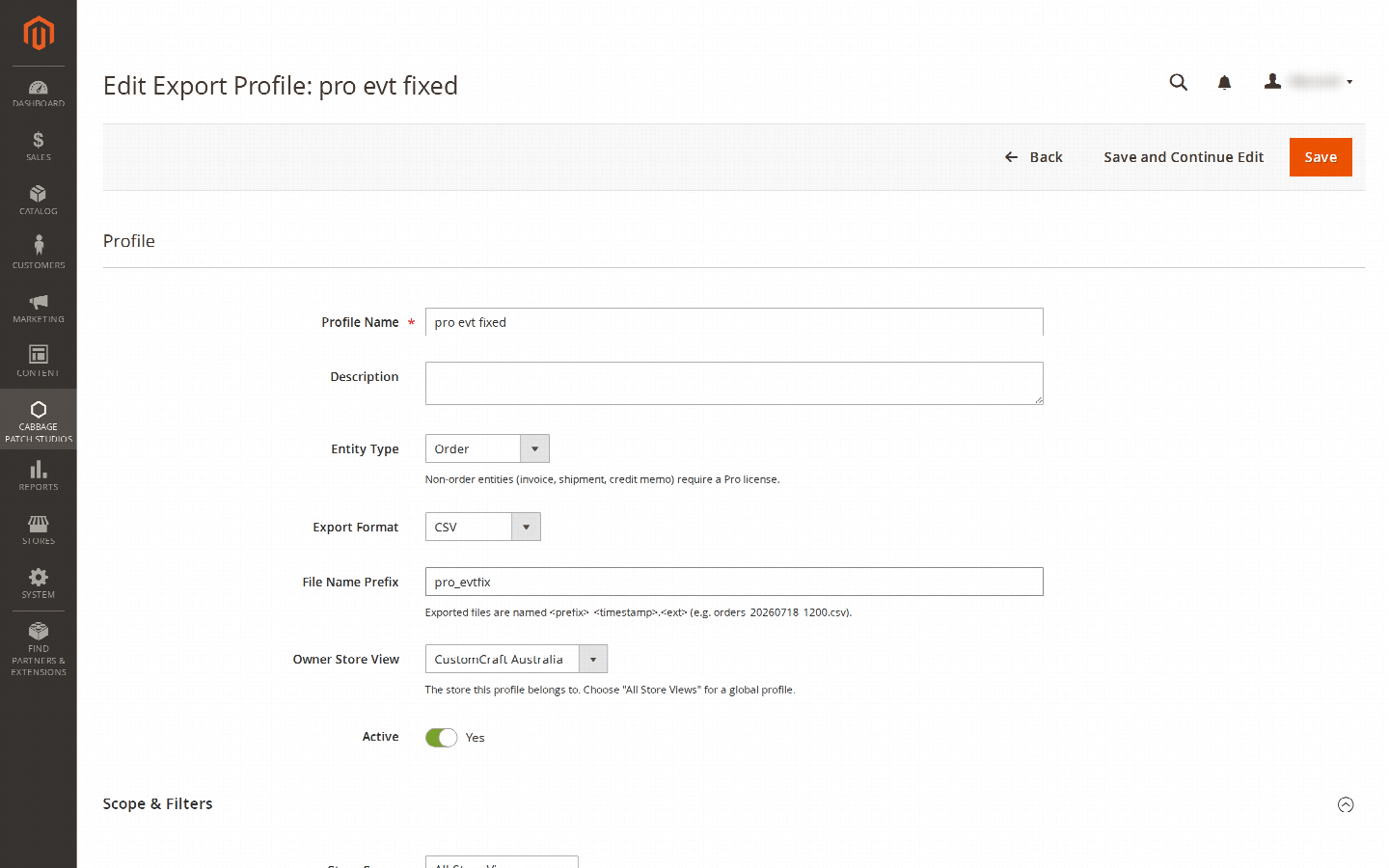
A profile is a saved, reusable export definition. Go to Sales → Order Export → Export Profiles and click Add New Profile. Each profile has:
- Entity type — Orders on Free; on Pro also Invoices, Shipments and Credit Memos.
- Format — CSV or XML on Free; on Pro also JSON, TSV and XLSX (emitted as dependency-free Excel-XML).
- Filters — order status, store view, and a date range (all / last-N-days / a custom from–to window). Only the matching records are exported.
- Field mapping — choose which columns to include, rename them, and set their order. This is how you produce a file that lines up with the system you’re feeding — an ERP, a 3PL, a marketplace, an accountant’s template.
- File prefix — the leading part of each generated file’s name, so exports are easy to recognise.
Save the profile and it appears in the grid. From there you can Export Now to run it immediately and download the file — the Free tier’s manual, local-download workflow — or hand it to a schedule, a trigger, or a destination as described below.
Scheduling, real-time triggers & delta (Pro)
Free profiles run when you click Export Now. Pro lets a profile run itself.
Scheduled (cron) exports
Give a profile a schedule and Magento’s cron runs it for you — nightly order dumps, hourly feeds, whatever cadence you set. Scheduling is evaluated per website, so a Pro profile on any of your sites runs correctly even though cron itself has no store context.
Event-triggered (real-time) exports
Mark a profile as event-triggered and it exports the instant the relevant thing happens — an order is placed, an invoice or shipment is created, a credit memo is issued — running in that record’s own store scope. Use this to feed a downstream system in near real time instead of waiting for the next scheduled batch.
Incremental / delta runs
Turn on incremental and a profile exports only what’s new since its last successful run, tracked by a watermark. The watermark only advances after a clean run, so a failed export doesn’t cause records to be skipped next time. This keeps recurring feeds small and avoids re-sending data the receiving system already has.
Destinations — where files are delivered
By default an export is a local download (Free). Pro adds delivery destinations, managed under Sales → Order Export → Destinations and attached to a profile. If one destination fails, it doesn’t abort the run — the others still receive their file.
| Destination | Tier | Key settings |
|---|---|---|
| Local download | Free | File written to the export directory and offered as a download. |
| Email attachment | Pro | Recipient address; the file is attached. Pair with the SMTP module for reliable delivery. |
| Webhook / REST (HTTP POST) | Pro | Target URL, plus optional auth and custom headers; the file/payload is POSTed. |
| SFTP | Pro | config JSON: host, port, user, pass, remote_path. |
| FTP | Pro | config JSON: host, port, user, pass, remote_path. |
| Google Sheets | Pro | config JSON: spreadsheet_id, service_account_json. |
The type-specific settings for SFTP, FTP and Google Sheets live in the destination’s config
JSON, with the keys shown above. Webhook destinations carry their URL, auth and headers directly.
Export history & retention
Every run — manual, scheduled or event-triggered — is recorded under Sales → Order Export → Export History. Each row shows the profile, status, record count, the generated file and its size, timings, and any error, so you always know what ran, when, and whether it succeeded.
History and generated files are cleaned up automatically according to the Retention days setting on the configuration screen, keeping the log and the export directory from growing without bound. A scheduled cleanup job does the pruning.
Notes & compatibility
Themes. Order Export is a backend-only module — there is no storefront output and no Alpine dependency, so it runs identically on Luma, Hyvä and Lurox (and any other theme). All of its surface is in the Magento admin.
Deliverability. Email delivery is only as reliable as your mail path — pair it with the CPS SMTP module or a reliable transactional provider so exported files actually arrive.
Changelog
This guide is itself a Lurox page. Every revision is a published version in Lurox's built-in content history, so we can roll any guide back to an earlier version at any time. The public changelog below tracks what changed and when.
18 July 2026
- Initial publication: getting started and licensing, creating an export profile with filters and field mapping, cron scheduling, event-triggered and incremental exports, the email/webhook/SFTP/FTP/Google Sheets destinations, and export history with retention.
Explore the rest of the library
Browse every Cabbage Patch Studios user guide in one place.
All User Guides