
Your whole Magento stack, on one screen.
Environment Info gathers your server, PHP, database, cache, search and Magento details onto a single admin dashboard — with health checks that flag problems before they bite. No SSH, no phpinfo(), no digging. And it's free.

"What's actually on the server?" shouldn't need an SSH session.
When a store is slow or a deploy fails, the first question is always the environment — PHP version and memory, OPcache, the database, the search engine, the mode. Answering it means SSHing in, running phpinfo(), and reading config files by hand, with the facts scattered across the shell and the admin.
Environment Info gathers all of it onto one read-only admin screen — with health checks that flag what's misconfigured before it turns into a slow store or a failed deploy. Free, on every store you run.
The answer to "what's on the server?"
Your whole stack, one screen
Server, PHP, database, cache, search, Magento, modules and disk — every detail a developer asks for, gathered onto a single admin page.
Health checks that catch problems
Colour-coded warnings flag low PHP memory, disabled OPcache, developer mode and missing extensions — before they turn into a slow store or a failed deploy.
Read-only, zero footprint
It only reads. No frontend output, no cron, no writes and no performance cost — just a diagnostic dashboard sitting quietly in your admin.
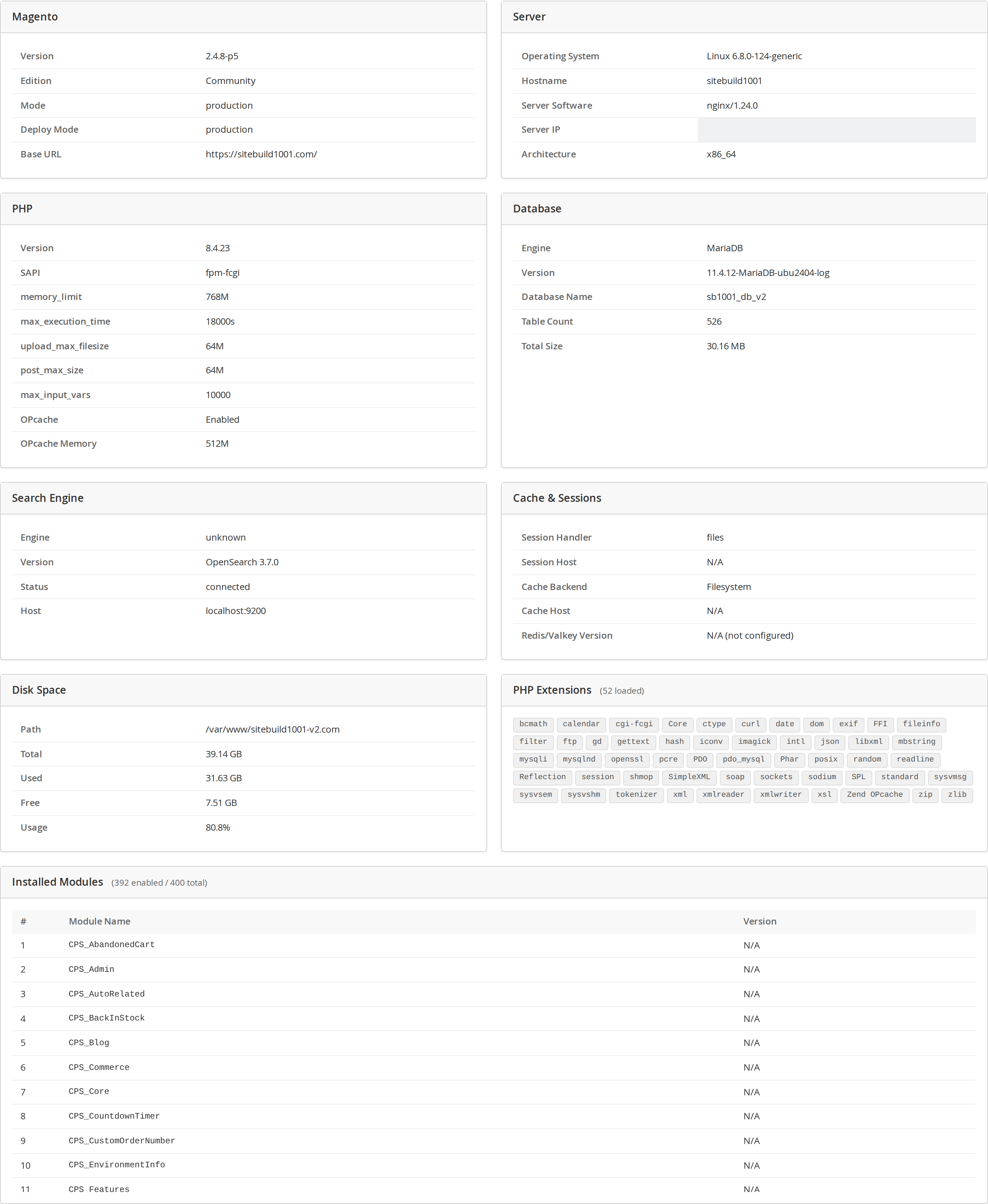
Everything, gathered for you.
One click in the admin and the whole environment is laid out in clean cards — no SSH session, no phpinfo() dump, no digging through config files. It's the page you send to a developer when something's wrong.
- Server, PHP, database, cache and search, side by side
- Magento version, edition, mode and base URL
- Every loaded PHP extension and installed module
- Disk usage for the Magento partition at a glance

Catch problems before they bite.
A built-in health check grades your environment against Magento's real-world requirements and flags what needs attention — colour-coded and sorted worst-first, so the important things jump out.
- Warns on low PHP memory and disabled OPcache
- Flags developer mode and short execution-time limits
- Errors on missing required PHP extensions
- Shows an "all clear" when your stack is set up right
Every detail, collected in one place.
Server & PHP
OS, hostname, web server and architecture — plus PHP version, SAPI, memory, execution time, upload limits, OPcache and every loaded extension.
Database, cache & search
MariaDB/MySQL version, database size and table count; your session and cache backends and Valkey/Redis version; OpenSearch/Elasticsearch version and status.
Magento, modules & disk
Magento version, edition and mode; a searchable list of every installed module and version; and disk usage for the Magento partition at a glance.
The environment overview and the health checks.


How to check your Magento 2 environment
- Install Environment Info (free) — download it from your Cabbage Patch Studios account.
- In the admin, open System → Environment Info (access is controlled by a dedicated admin permission, so you decide who can see it).
- The dashboard gathers your server, PHP, database, cache, search and Magento details into cards, plus a searchable list of every installed module and a disk-usage overview.
- It reads on demand only — nothing is stored, nothing is written, and there's no frontend impact.
How to read the health checks and fix what they flag
- Open the Health Check card — results are colour-coded and sorted worst-first.
- An ERROR means a required PHP extension is missing — install it before you go live.
- A WARNING flags PHP memory below the recommended 768M, disabled OPcache, or developer mode on a live store — raise the memory, enable OPcache, or switch to production.
- An INFO note (e.g. max_execution_time under 120s) is a heads-up; an "All Clear" means your stack is set up right.
Every check maps to a real Magento requirement — nothing invented.
Why it matters
Stop guessing what's on the server.
When a store is slow or a deploy fails, the first question is always “what's the environment?” Environment Info answers it in one click — no SSH session, no phpinfo() dump, no back-and-forth. Free, on every store you run.
Get it freeWhy merchants pick CPS Environment Info
Genuinely free
A complete environment + health dashboard, free forever for every store — a free account to download, no card, and no key at runtime.
Your whole stack, one screen
Server, PHP, database, cache, search, Magento, every installed module and disk usage — the whole picture without an SSH session.
Health checks, not just facts
Colour-coded checks against Magento's real requirements — low PHP memory, disabled OPcache, developer mode, missing extensions — sorted worst-first.
Read-only and safe
No frontend output, no cron, no writes, no external calls. Access is gated by a dedicated admin permission, so you decide who can open it.
Zero footprint
It only reads, and only when you open the page — no background jobs and no performance cost on your store.
Any theme, multi-store
A backend dashboard independent of your storefront — works on Luma, Hyvä and Lurox, across every store.
Why merchants switch
The phpinfo() way vs Environment Info
The phpinfo() way
- SSH in and run phpinfo(), or read config files by hand
- Facts scattered across the server, shell and admin
- Nothing tells you what's actually misconfigured
With Environment Info
- One admin page — server, PHP, DB, cache, search, Magento
- Health checks flag the problems for you
- Read-only and safe to hand to anyone with admin access
Free, forever
Every answer in one click, $0.
Free for every store. Create a free account to download — no card, no catch.
Environment Info
Free forever- One-screen dashboard: server, PHP, database, cache, search, Magento
- Every installed module and loaded PHP extension
- Colour-coded health checks with a disk-usage overview
- Read-only — no frontend impact, no cron, no writes
- Works on Luma, Hyvä & Lurox · multi-store
The details.
One screen
Whole stack at a glance.
Health checks
Warns on real misconfig.
Read-only
No frontend, no writes.
Any theme
Luma, Hyvä & Lurox · multi-store.
Release history
Actively maintained — every entry maps to a real release.
Questions, answered.
Server (OS, hostname, web server, architecture), PHP (version, SAPI, memory, execution time, upload limits, OPcache, extensions), database (engine, version, size, table count), cache and sessions, search engine, Magento version/edition/mode, disk usage, and a full list of installed modules — all on one admin page.
No. It's a read-only admin dashboard with no frontend output, no cron jobs and no writes. It only gathers information when you open the page, so there's zero impact on your store or its speed.
Common environment problems: PHP memory below Magento's recommended minimum, disabled OPcache, developer mode, short execution-time limits, and missing required PHP extensions. Results are colour-coded and sorted worst-first, with an "all clear" when everything's right.
Yes. It's read-only and access is controlled by a dedicated admin permission, so you decide who can open it. It changes nothing about your store.
Yes. It's a backend dashboard, so it's independent of your storefront theme and works on Luma, Hyvä and Lurox alike, across every store.
It's free, forever, for every store. You create a free Cabbage Patch Studios account to download it — no credit card — and it works without any key.
Need a diagnostic we don't ship?
Environment Info covers the standard server, PHP, database and health picture out of the box. If you need more — a scheduled environment snapshot, an export to share with support, extra custom checks, or an alert when something drifts — tell us about your store and we'll scope it, usually within one business day.
We build these alongside Environment Info, so you keep the dashboard and add exactly what you need.
See your whole environment in one click.
A read-only server, PHP, database and health dashboard for Magento 2 — every answer on one screen, no SSH required. Free for every store.
Get it free