

Environment Info User Guide
Your whole Magento stack — server, PHP, database and health — on one read-only admin screen.
Your whole Magento stack, on one screen
Environment Info gathers everything a developer asks for when a store is slow or a deploy fails —
your server, PHP, database, cache, search engine, Magento version and disk usage — onto a single
admin page, with health checks that flag common problems before they bite. No SSH session, no
phpinfo() dump, no digging through config files.
It is read-only: it only reads information when you open the page. There is no frontend output, no cron job, no writes and no external calls, so there is zero impact on your store or its speed. And it's free — create a free Cabbage Patch Studios account to download it, and it runs without any licence key.
What the dashboard shows
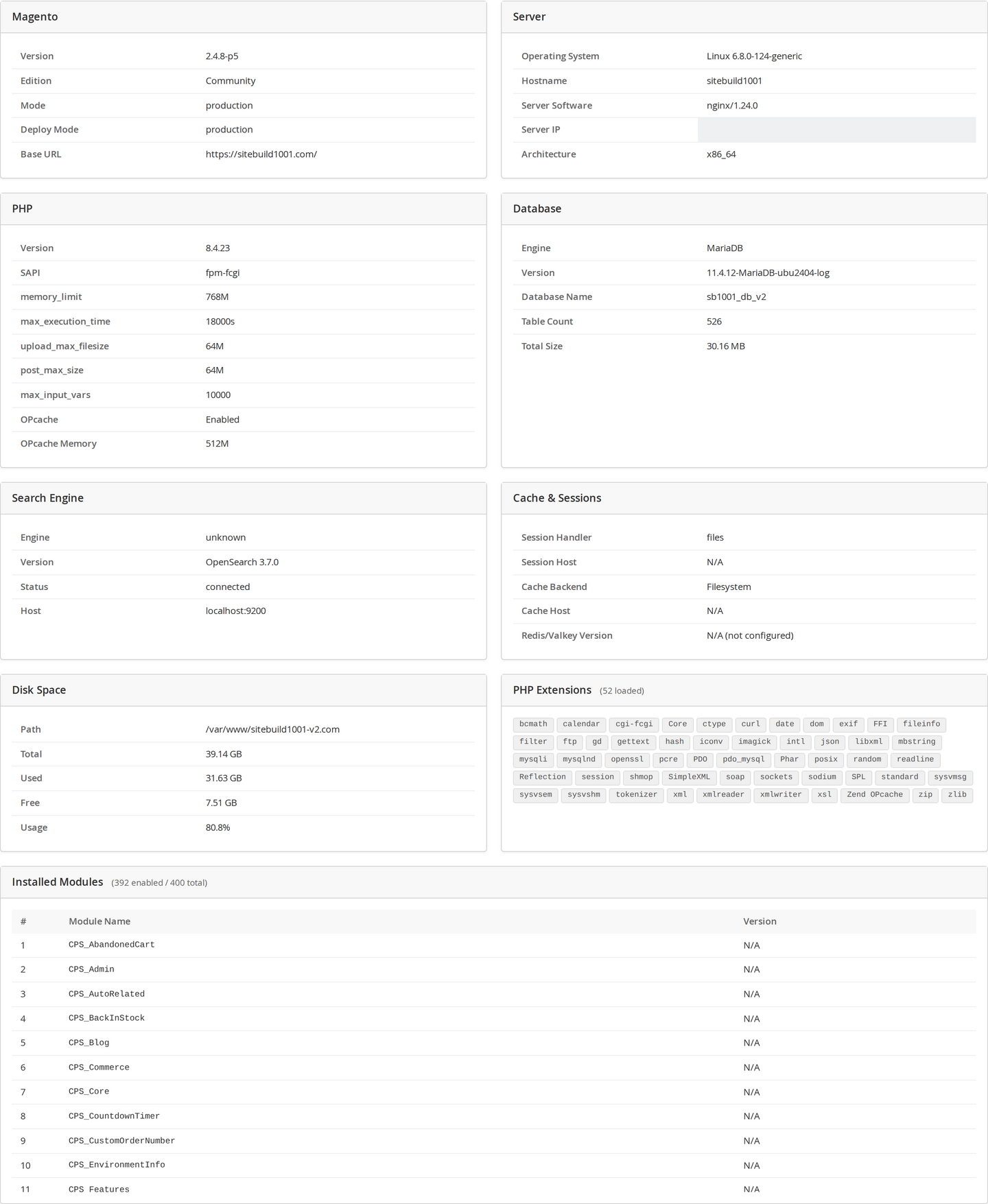
Open the dashboard and the whole environment is laid out in clean cards:
- Server — operating system, hostname, web server, IP and architecture.
- PHP — version, SAPI,
memory_limit,max_execution_time, upload/post limits,max_input_vars, OPcache status and every loaded extension. - Database — engine, version, database name, table count and total size.
- Search — engine (OpenSearch / Elasticsearch), version, status and host.
- Cache & Sessions — your cache and session backends, and the Valkey/Redis version.
- Magento — version, edition, mode, deploy mode and base URL.
- Disk Space — total, used and free for the Magento partition, with a usage donut.
- Installed Modules — a searchable list of every module and its version, with enabled/total counts.
The health checks
Beyond the raw facts, a built-in Health Check grades your environment against Magento's real-world requirements and sorts the results worst-first, so the important things jump out:
| Level | What triggers it |
|---|---|
| Error | A required PHP extension is missing — install it before going live. |
| Warning | PHP memory_limit below the recommended 768M, OPcache disabled, or Magento running in developer mode on a live store. |
| Info | A heads-up, e.g. max_execution_time under 120s — some long operations may time out. |
| All Clear | Everything meets the recommended baseline. |
Each check maps to a genuine Magento recommendation — nothing is invented. Fix an Error before you go live; act on Warnings to keep the store fast and stable; treat Info notes as advisories.

Opening it & who can see it
- Install Environment Info (free) — download it from your Cabbage Patch Studios account.
- In the admin, go to System → Environment Info.
- The dashboard gathers and displays everything on demand. Nothing is stored and nothing is written.
Access is controlled by a dedicated admin permission, so you decide exactly who can open it. Because it's read-only and changes nothing about your store, it's safe to hand to anyone on your team who needs to see the environment — or to copy the details from when you raise a support ticket.
It's a backend dashboard, independent of your storefront theme, so it works the same on Luma, Hyvä and Lurox, across every store view.
FAQ
Does it affect my storefront or performance? No. It has no frontend output, no cron jobs and no writes, and it only reads information when you open the page — so there's zero impact on your store or its speed.
Is it safe to give to my team? Yes. It's read-only and gated by a dedicated admin permission; it changes nothing.
Does it store or send my data anywhere? No. It makes no external calls and keeps no history — it reads the live environment each time you open the page.
What does it cost? It's free, forever, for every store. You create a free account to download it — no credit card — and it works without any key.
Changelog
This guide is itself a Lurox page. Every revision is a published version in Lurox's built-in content history, so we can roll any guide back to an earlier version at any time. The public changelog below tracks what changed and when.
21 July 2026
- Initial publication: what the dashboard shows, the health checks, how to open it and who can see it, and FAQ — with annotated dashboard and health-check screenshots.
Explore the rest of the library
Browse every Cabbage Patch Studios user guide in one place.
All User Guides