
A real blog for Magento 2 — built for SEO, built to sell.
Magento has no native blog. This is a full one — posts, categories, tags, RSS and JSON-LD structured data, free — with pretty SEO URLs that actually resolve. Upgrade for comments, scheduled publishing, and related products that send readers straight to the cart.

The problem
Magento ships no blog — so most stores bolt on a thin one and get nothing back from search.
They publish on an ugly URL and earn nothing from it. Content is how stores earn organic traffic and get cited by AI answers — but only if it’s structured, fast, and linked to the products it talks about.
A blog, SEO, and a path to the cart — the whole job.
A complete blog, free
Posts, categories and tags with full admin CRUD, a paginated listing, and single-post / category / tag pages — on clean SEO URLs (/blog/your-post) generated as native Magento URL rewrites, not a fragile custom router.
Built for SEO and AI answers (free)
Every post emits JSON-LD BlogPosting structured data (rich-result eligible) and carries its own meta title/description, plus an RSS feed. This is the free wedge most rivals charge for.
Turns readers into buyers (Pro)
Attach related products to any post so a reader goes straight from the article to the product. Add comments with moderation and built-in spam protection, schedule posts ahead, feature your best, and drop a blog sidebar widget anywhere.
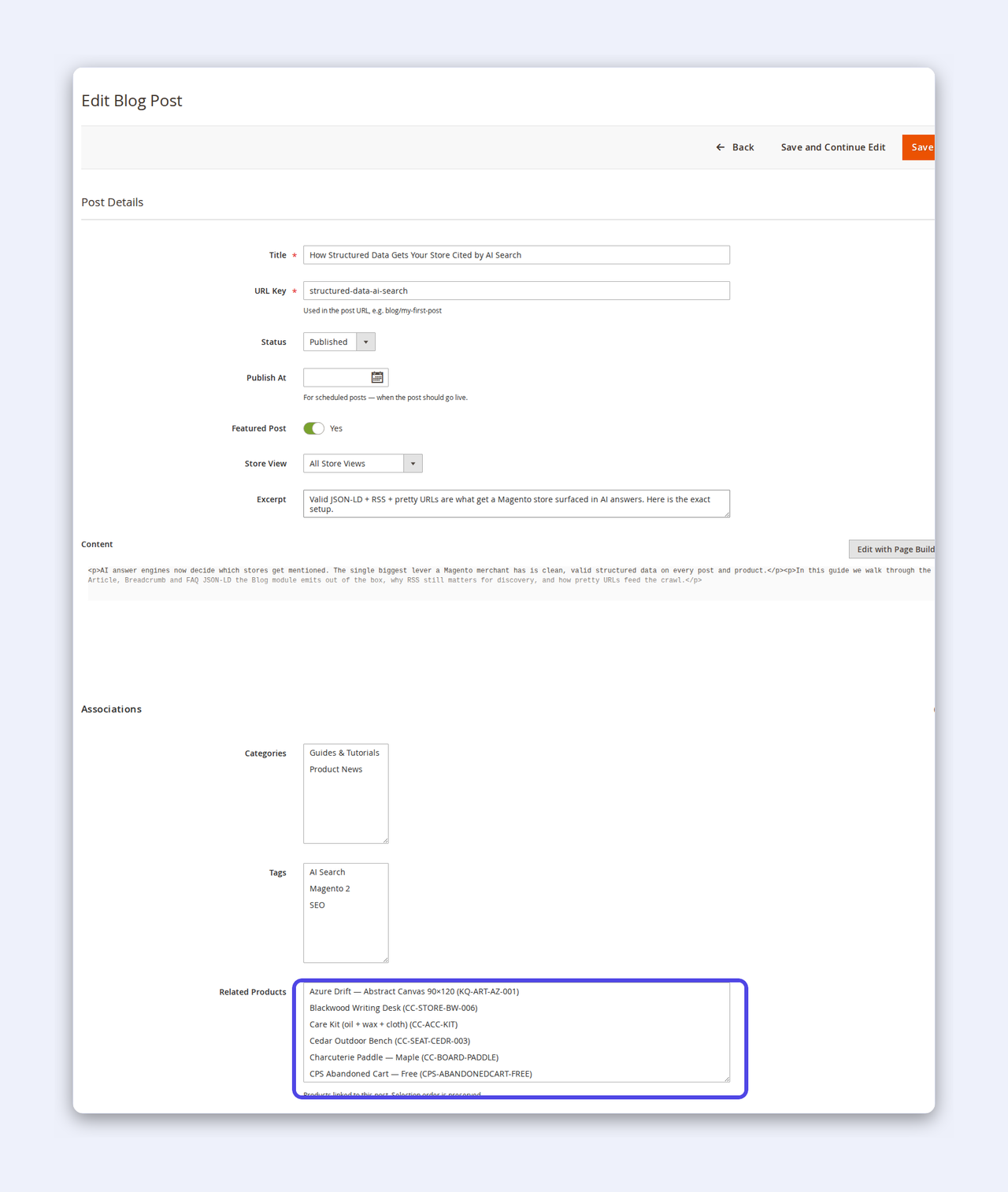
Write a post, wired for SEO and for sales.
Write a post in the admin the way you’d expect — a title, a clean URL key, a rich-text body and an excerpt — then wire it up to everything it should touch, all on one screen.
- Assign categories and tags, and set a per-post meta title & description (free)
- Attach related products so the article links straight to what it sells (Pro)
- Flag a post as featured, or set it to publish now, later or on a schedule (Pro)
- Set the author and a featured image, and save — the pretty URL is generated for you
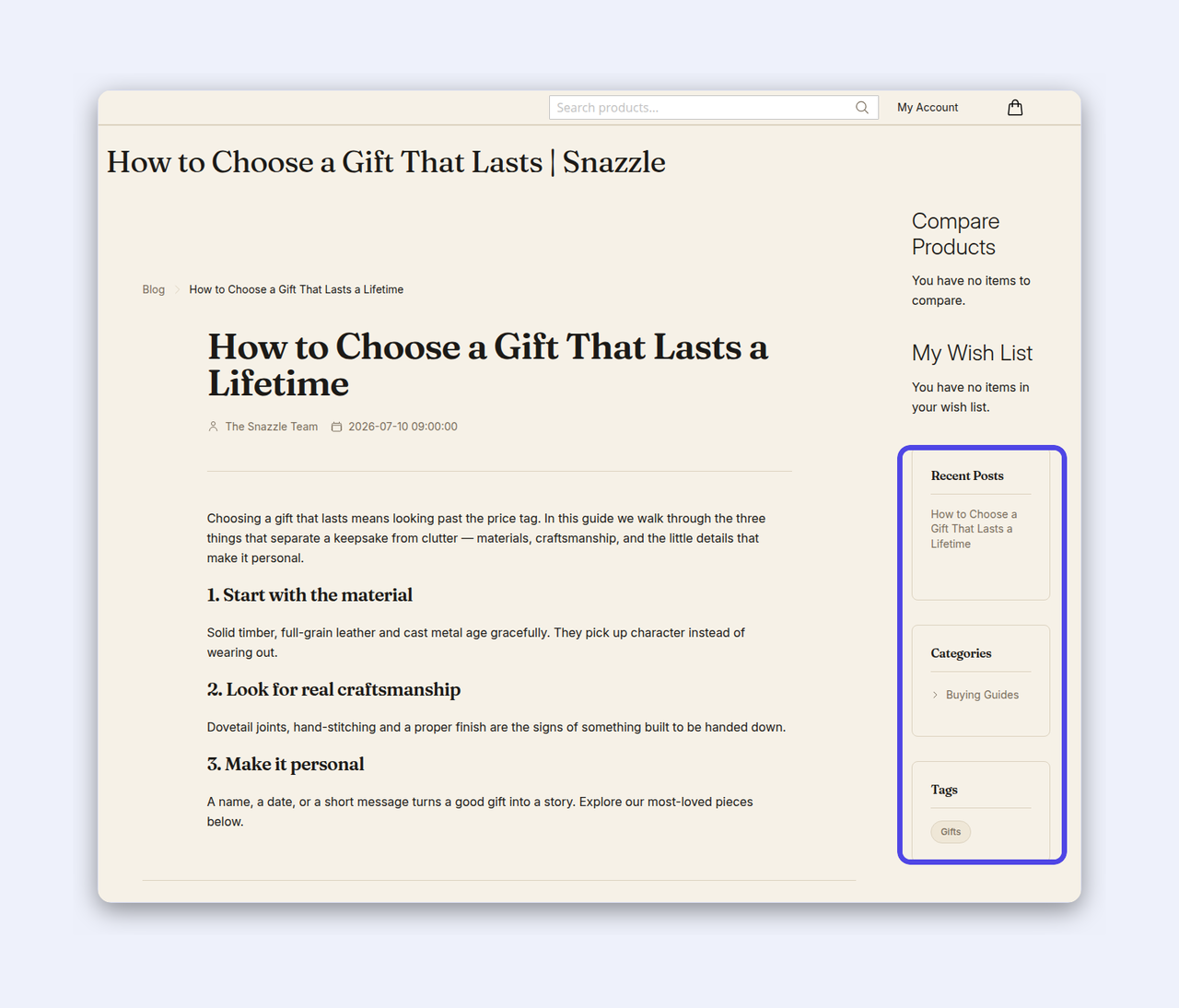
Live on a clean URL, structured for search.
The post goes live on a real /blog/your-post URL — a native Magento URL rewrite, not a bolt-on router that 404s. It’s structured for search out of the box, and it looks at home on your theme.
- JSON-LD BlogPosting structured data on every post, free — rich-result and AI-answer eligible
- Static-first templates that render with JavaScript off, on Luma, Hyvä and Lurox
- A placeable sidebar widget — recent posts, categories and tags (Pro)
- An RSS feed at
/blog/feed/rssfor syndication and discovery
Why merchants pick CPS for their Magento blog.
Native URL rewrites
Real /blog/your-post URLs resolved by Magento's own rewrite router, not a bolt-on router that 404s or fights your other extensions.
SEO in the free tier
JSON-LD structured data, per-post meta and RSS, free. The stuff that earns organic traffic and AI citations isn't paywalled.
Commerce-aware
Related products on posts turn content into a conversion path, not a dead end. This is a Magento blog, not a generic CMS.
Self-hosted, theme-agnostic
Luma, Hyvä and Lurox; static-first templates that render with JavaScript off. Comment spam is stopped in-module — no third-party CAPTCHA.
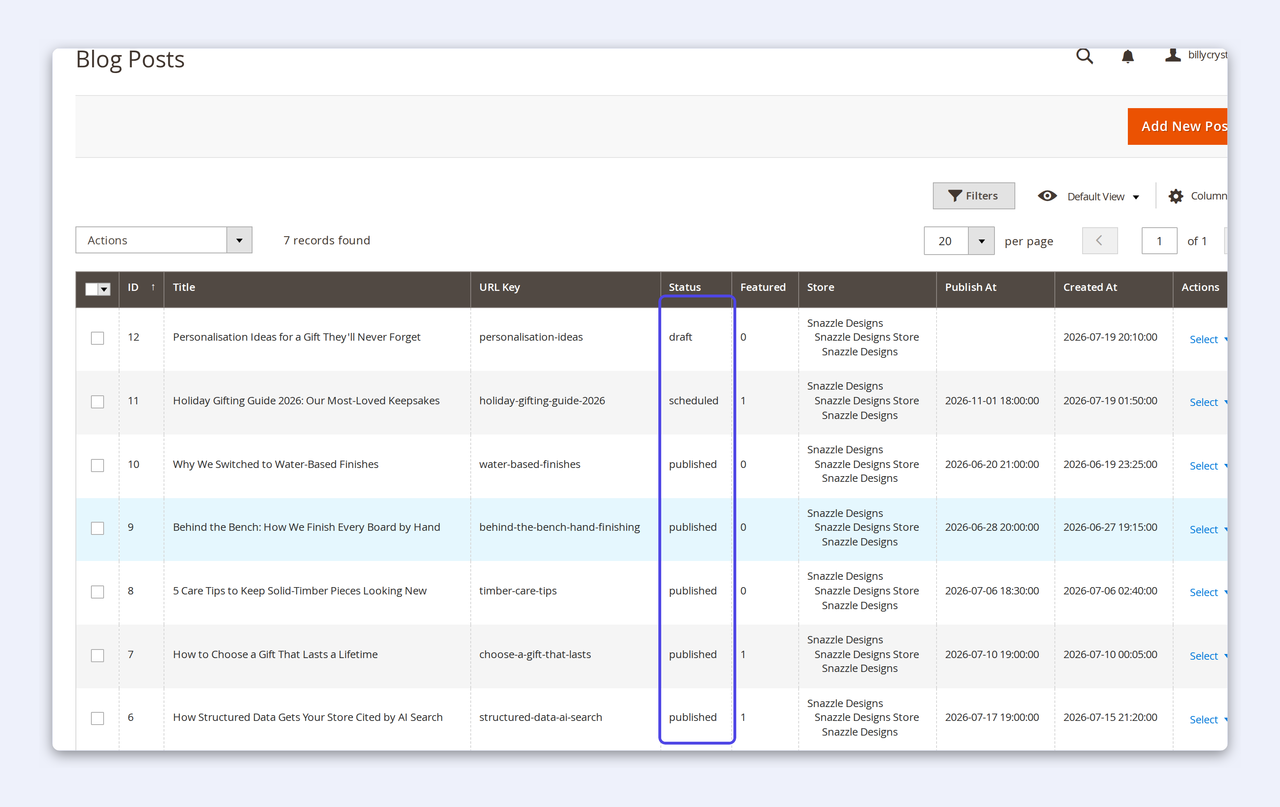
Manage it all from one grid.
Run the whole blog from one familiar Magento grid. Every post, every status, at a glance — with the same filtering, sorting and mass actions you already know.
- Publish now, save as a draft, or schedule a post to go live later (Pro)
- Mark your best posts as featured to surface them on the listing (Pro)
- Filter and sort by status, date, store view or author; bulk-delete in one action
- Scoped per store view, so each storefront runs its own blog
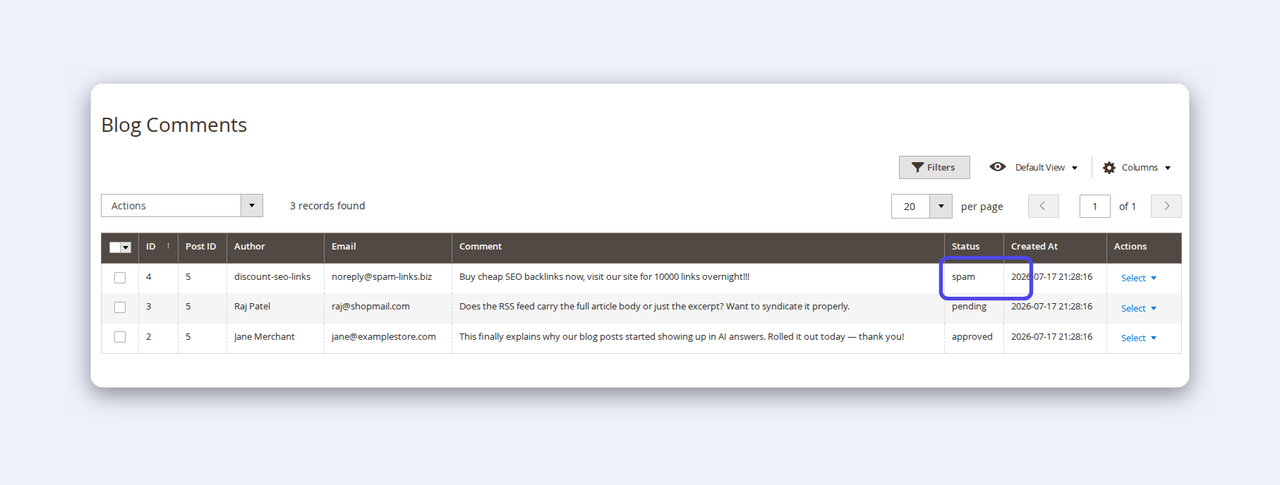
Comments, with spam caught before it lands.
Turn readers into a conversation without turning your inbox into a spam magnet. Comments come with moderation and a built-in spam filter, so nothing goes live until you say so.
- Every comment lands as pending — approve, mark as spam or delete in bulk
- SpamGuard catches bots at submission with a honeypot + a signed timing check — no third-party CAPTCHA
- Optional guest comments and auto-approve, configured per store
- A clean moderation grid you filter by status — pending, approved, spam
See it in the admin — and on the storefront.
How-to
How to add a blog to Magento 2
Magento has no native blog. Here’s how to stand up a real one, on clean SEO URLs, in a few minutes — no code, no core changes.
- 1Install the module and, in the admin, open Stores → Configuration → Content: Blog and set Enable Blog to Yes (it ships off by default).
- 2Go to Cabbage Patch Studios → Blog → Blog Categories and add a category or two — say Guides and News.
- 3Open Blog Posts → Add New Post, write your first article, set a URL key and pick its categories and tags.
- 4Set the meta title & description, then Save — the pretty
/blog/your-postURL is generated as a native rewrite. - 5Publish. Your post is live, in the listing and RSS feed, with JSON-LD structured data emitted automatically.
How-to
How to get your Magento posts into AI answers
AI search engines cite content they can parse and trust. The Blog module gives you the three things they look for — free.
- 1Publish real, useful posts — every one emits JSON-LD BlogPosting structured data automatically (free), so machines can read it.
- 2Give each post a specific meta title & description that answers a real question a shopper would ask.
- 3Keep URLs clean — native
/blog/your-postrewrites resolve reliably and are easy for crawlers to follow. - 4Expose the RSS feed at
/blog/feed/rssso discovery tools and aggregators can find new posts fast. - 5Link posts to the related products they mention (Pro), so the content and the catalogue reinforce each other.
Why it matters
Content is how modern stores get found.
Organic search and AI answers send buyers who are already looking. A blog that’s structured, fast and linked to your products turns that traffic into carts — instead of a dead-end page on an ugly URL. Start free; upgrade when your content starts selling.
Get it freeFree vs Pro
Start free. Upgrade to sell from your content.
Licensed per website — one Pro key covers one storefront domain, perpetual with updates. Comment reply threading, a category-tree admin UI and an Alpine related-products carousel are on the roadmap for a future release.
Start free, upgrade when content starts selling
Comments, scheduling, related products and the sidebar widget — $299.
Licensed per website. Perpetual — your licence never expires.
Free
Free- The whole blog — posts, categories, tags on pretty SEO URLs
- Listing, single-post, category and tag pages
- JSON-LD BlogPosting structured data + RSS feed
- Per-post meta title / description
Pro
Pro- Everything in Free, plus:
- Comments + moderation + built-in spam protection
- Scheduled publishing
- Related products on posts — blog→cart
- Featured posts + placeable sidebar widget
- Advanced SEO (listing-level meta)
- 12 months of updates & support
Actively maintained
A new module, shipping fixes.
A short, honest version history — every release verified on Magento 2.4.x.
- v1.0.1Jul 2026Maintenance — hardened the admin Tag grid query (qualified an ambiguous column) so tag management stays solid on large catalogues.
- v1.0Jul 2026First release — a complete Magento 2 blog: posts, categories and tags on native SEO URLs, JSON-LD structured data and RSS free; comments, scheduling, related products, featured posts and the sidebar widget on Pro.
Questions, answered.
No — there's no native blog. CPS Blog adds a complete one: posts, categories, tags, RSS and structured data, with pretty SEO URLs.
Yes — it's a full, SEO-ready blog: JSON-LD structured data, per-post meta and an RSS feed included. Most rivals charge for exactly that.
Comments with moderation and spam protection, scheduled publishing, related products on posts, featured posts, a placeable sidebar widget, and advanced SEO.
Yes — /blog/your-post (prefix configurable), generated as native Magento URL rewrites, so they resolve cleanly and play nicely with the rest of your store.
SpamGuard catches bots at the moment they submit, using a hidden honeypot field and a signed timing check — no third-party CAPTCHA, and every real comment still lands as pending for your review.
Templates are static-first and render with JavaScript off, on Luma, Hyvä and Lurox. Structured data is emitted server-side.
Per website — one domain per key — and perpetual, with 12 months of updates and support included. Your store keeps working whether or not you renew.
Need a custom blog layout, or a migration from your old blog?
The module covers posts, categories, tags, SEO URLs, structured data, RSS, comments, scheduling and related products out of the box. If you need the listing and post templates designed to your brand, a migration from WordPress or another blog, or a bespoke content-to-product rule, tell us about your store and we'll scope it — usually within one business day.
We build these on top of the Blog module, so you keep the whole toolkit and add exactly what you need.
A real blog for Magento 2 — built for SEO, built to sell.
Posts, categories, tags, RSS and JSON-LD structured data on native SEO URLs — free. Pro adds comments, scheduled publishing and related products that send readers straight to the cart — from $299.
See Pro — $299