

Blog User Guide
A complete Magento blog on native SEO URLs — posts, categories, tags, structured data and RSS free, with comments, scheduling and related products on Pro.
What the Blog module does
Magento has no native blog. The Blog module adds a complete one — posts, categories and tags with
full admin CRUD, a paginated listing plus single-post, category and tag archive pages, all on pretty SEO URLs
(/blog/your-post) generated as native Magento URL rewrites, not a fragile custom
router. It runs entirely inside your store, on Luma, Hyvä and Lurox alike.
It’s freemium. The Free tier ships the whole blog: posts, categories and tags, the
listing and archive pages, JSON-LD BlogPosting structured data, an RSS feed, and per-post meta
title/description. Pro ($299, per website) adds the commerce and workflow layer: comments with
moderation and built-in spam protection, scheduled publishing, related products on posts, featured posts, a
placeable sidebar widget, and advanced (listing-level) SEO.
Enabling the module
Once the module is installed and enabled, its settings live under Stores → Configuration → Cabbage Patch Studios → Blog. Your Free key registers the install but is never required to run; enter a per-website Pro key at website scope to unlock the Pro features (see Licensing). The blog’s admin lives under Content → Blog, where you manage posts, categories and tags.
Writing posts (Free)
Create a post under Content → Blog → Posts. Each post carries the fields you’d expect, plus the SEO metadata that makes it earn its keep:
- Title & content — the post headline and body. The body is rich HTML, so you can embed headings, images, lists and links.
- URL key — the slug that becomes the post’s address. Combined with the blog URL
prefix it produces a clean, native URL such as
/blog/your-post. - Per-post meta title & description — override the SEO title and meta description for each post independently, so every article can target its own search intent.
/blog prefix is a setting — change it once and every post URL is rewritten to match. The
addresses are native Magento URL rewrites, so they resolve cleanly and don’t collide with the rest of your
store.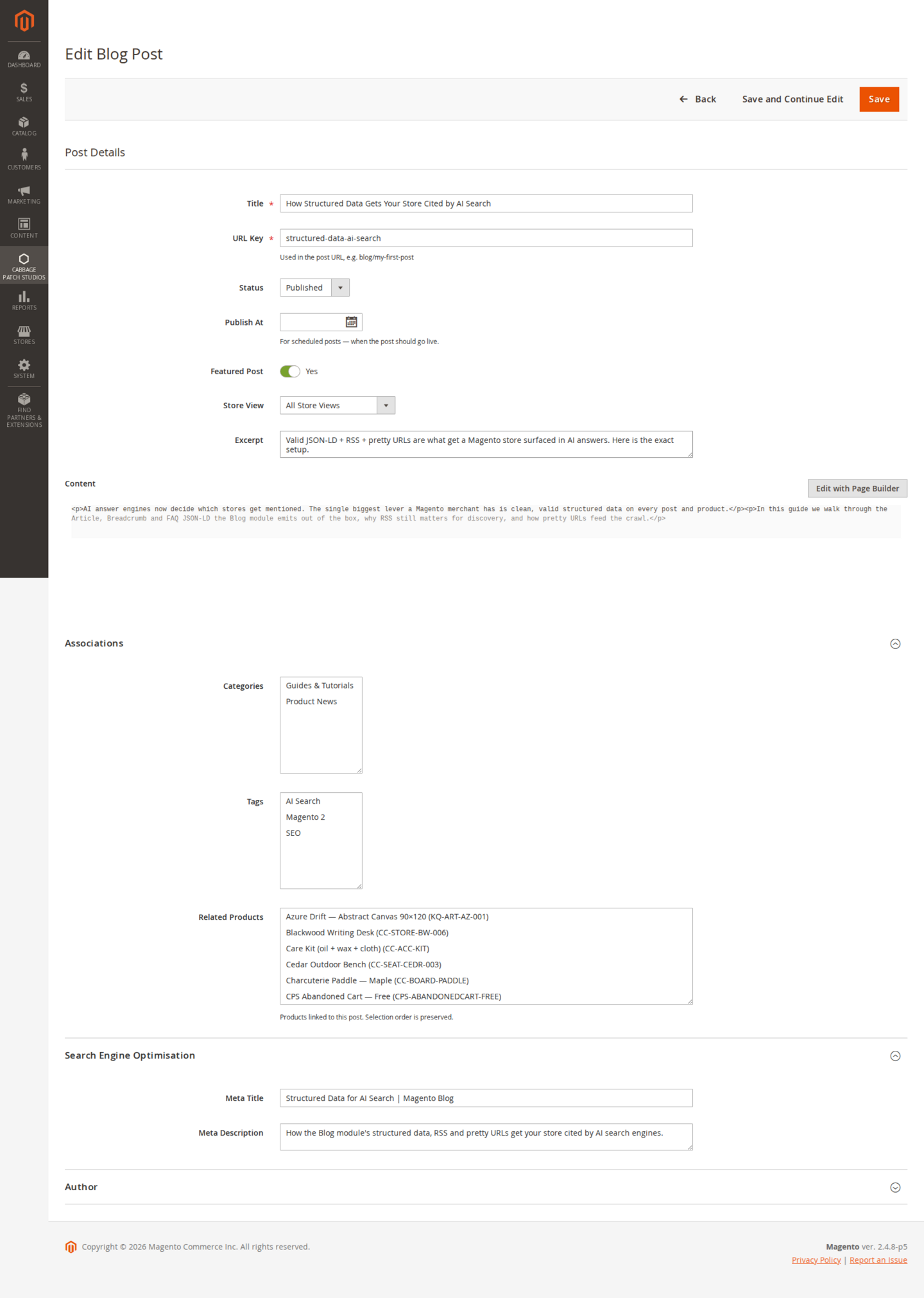
Categories & tags (Free)
Organise posts so readers — and search engines — can navigate them.
- Categories — create categories under Content → Blog → Categories and assign posts to them. Each category gets its own archive page listing its posts.
- Tags — add free-form tags to posts for cross-cutting topics. Each tag has its own archive page too.
- Archive pages — the listing, category and tag pages are all paginated and render on the same clean URL scheme as posts.
Structured data & RSS (Free)
This is the free wedge most rivals charge for — and it’s what turns a blog into an organic-traffic and AI-citation channel.
- JSON-LD structured data — every post emits
BlogPostingstructured data server-side, making it eligible for rich results. You can validate a post with Google’s Rich Results Test. - Per-post meta — the meta title and description you set on each post feed the page head directly.
- RSS feed — the blog publishes an RSS feed so readers and aggregators can subscribe, and search/AI crawlers can discover new posts quickly.
Scheduled publishing (Pro)
Pro lets you write ahead and let Magento publish for you.
- Status & publish-at — set a post to publish at a future date and time instead of going live the moment you save it.
- Cron promotes the post — a scheduled job checks for due posts and makes them live at the appointed time, so nothing depends on you being at the keyboard.
Related products on posts (Pro)
This is what makes it a Magento blog rather than a generic CMS: attach products to a post so a reader goes straight from the article to the product.
- Attach products — on a post, add the products it talks about.
- Renders blog→cart — the attached products render on the post as a link straight to each product page, turning a piece of content into a conversion path instead of a dead end.
Comments & moderation (Pro)
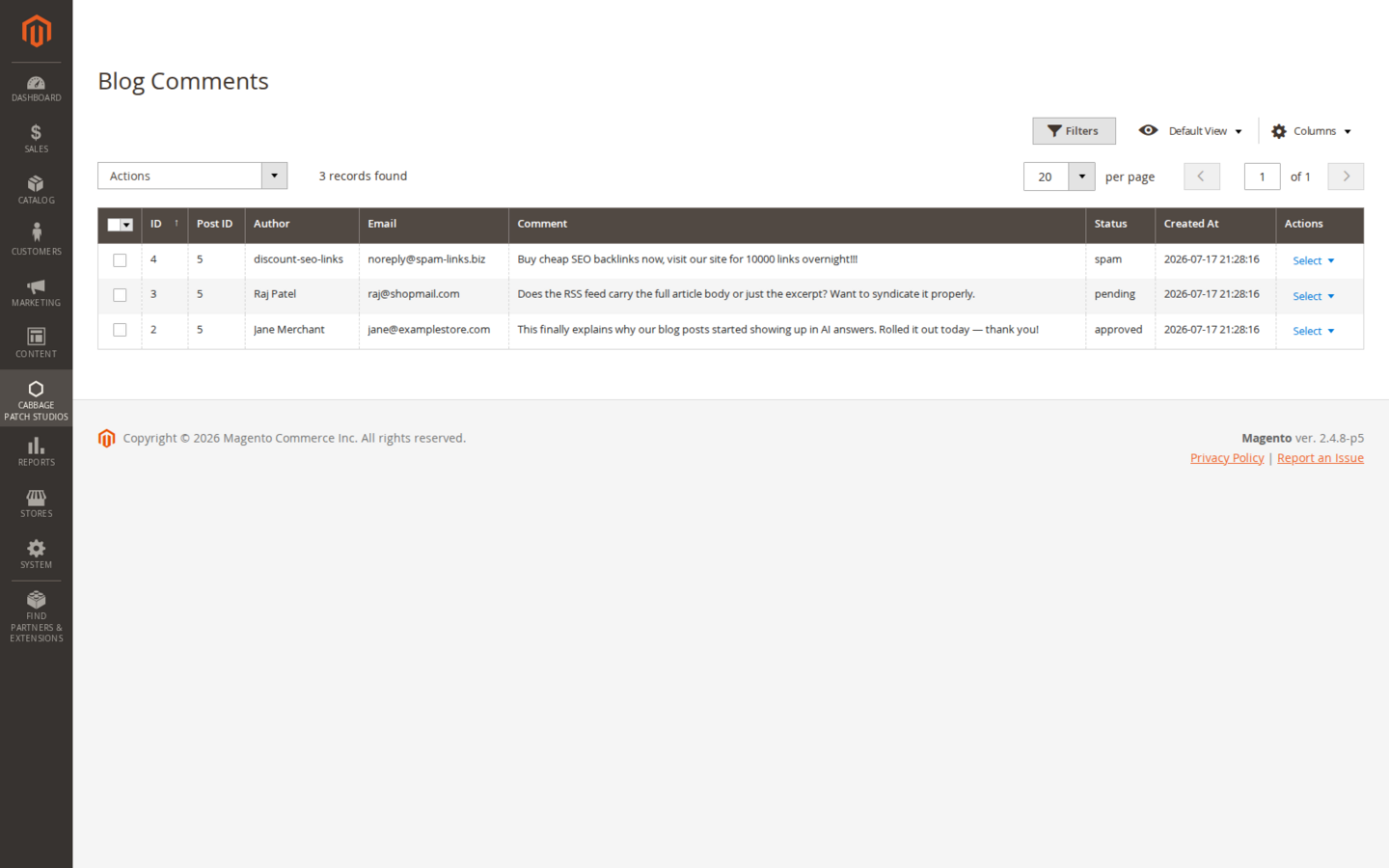
Pro adds reader comments with the moderation and spam handling you need to run them safely.
- Enable comments — turn commenting on for the blog; readers can leave a comment on a post.
- Moderation queue — new comments wait for approval so nothing appears until you’ve seen it. Approve, or delete, from the admin.
- Built-in spam protection — comment spam is stopped in-module, with no third-party CAPTCHA to bolt on.
Featured posts & the sidebar widget (Pro)
Surface your best content anywhere on the storefront.
- Featured posts — mark posts as featured so you can highlight them on the blog and in the sidebar widget.
- Placeable sidebar widget — drop a blog widget (recent or featured posts, categories and tags) into any theme via Magento’s widget system, so it works on Luma, Hyvä and Lurox without touching templates.
Licensing
Pro is licensed per website (one domain per key). Set your licence key at website scope; the Free tier has its own free key, which registers your install rather than gating it. Feature gating reads a cached licence response with a durable database fallback, so a cache flush never silently drops you to Free mid-session. The licence is perpetual, with 12 months of updates and support included.
| Capability | Tier |
|---|---|
| Posts, categories, tags (admin CRUD) | Free |
| Pretty SEO URLs (native url_rewrite) | Free |
| Listing + post + category + tag pages | Free |
| JSON-LD structured data (BlogPosting) | Free |
| RSS feed | Free |
| Per-post meta title / description | Free |
| Comments + moderation + spam protection | Pro |
| Scheduled publishing | Pro |
| Related products on posts (blog→cart) | Pro |
| Featured posts | Pro |
| Placeable sidebar widget | Pro |
| Advanced SEO (listing-level meta) | Pro |
Notes & compatibility
Themes. The blog listing, post, category and tag pages are static-first, so they render on Luma, Hyvä and Lurox and degrade gracefully with JavaScript off — interactivity layers on top where Alpine is present.
SEO. Structured data, per-post meta and the RSS feed are all emitted server-side, so search and AI crawlers see them on first load. Validate any post with Google’s Rich Results Test after publishing.
Changelog
This guide is itself a Lurox page. Every revision is a published version in Lurox's built-in content history, so we can roll any guide back to an earlier version at any time. The public changelog below tracks what changed and when.
17 July 2026
- Added admin screenshots — the post editor (with the Associations and SEO panels) and the comment moderation grid.
17 July 2026
- Initial publication: install, writing posts with SEO URLs and per-post meta, categories and tags, JSON-LD structured data and RSS, the Pro scheduled publishing, related products on posts, comments and moderation, featured posts and the sidebar widget, and licensing.
Explore the rest of the library
Browse every Cabbage Patch Studios user guide in one place.
All User Guides