

Review Reminder User Guide
Automatically invite customers to review what they bought, a few days after it ships — and turn fulfilled orders into fresh reviews.
What it does
Review Reminder does one job, and does it automatically: a set number of days after an order ships, it emails the customer and invites them to review what they bought. There are no lists to build and nothing to trigger by hand — every fulfilled order quietly schedules its own reminder, and the module sends it when the time comes.
More reviews mean stronger social proof on your product pages, which lifts the confidence — and the conversion — of every future shopper. Review Reminder turns orders you have already fulfilled into that stream of fresh reviews, on autopilot.
How it works
The flow is deliberately simple:
- An order ships. When you create a shipment for an order, Review Reminder schedules a single reminder for it — dated a configurable number of days into the future (7 by default).
- The reminder waits. It sits quietly until its send date. Each order gets exactly one reminder, so customers are never double-emailed.
- The email goes out. Once a day, a background task collects every reminder that has come due and sends it — a friendly note inviting the customer to review their purchase.
- One-click unsubscribe. Every email carries its own unsubscribe link, secured by a unique, non-guessable token. One click and that customer is opted out — no login, no account needed.
Robust by design If an email cannot be delivered, the reminder is retried on later daily runs and then quietly retired after a few failed attempts — so a single bad address can never hold up the queue or loop forever.
Licensing
Review Reminder is a paid module. It needs an active licence key for your website before it will schedule or send anything. This gate is absolute: with no valid licence the module stays completely silent — no reminders are scheduled when orders ship, and none are sent — even if the feature is switched on in configuration.
In short Enter your licence key at the website scope, then enable the feature. Until both are done, shipping an order does nothing.
Configuration
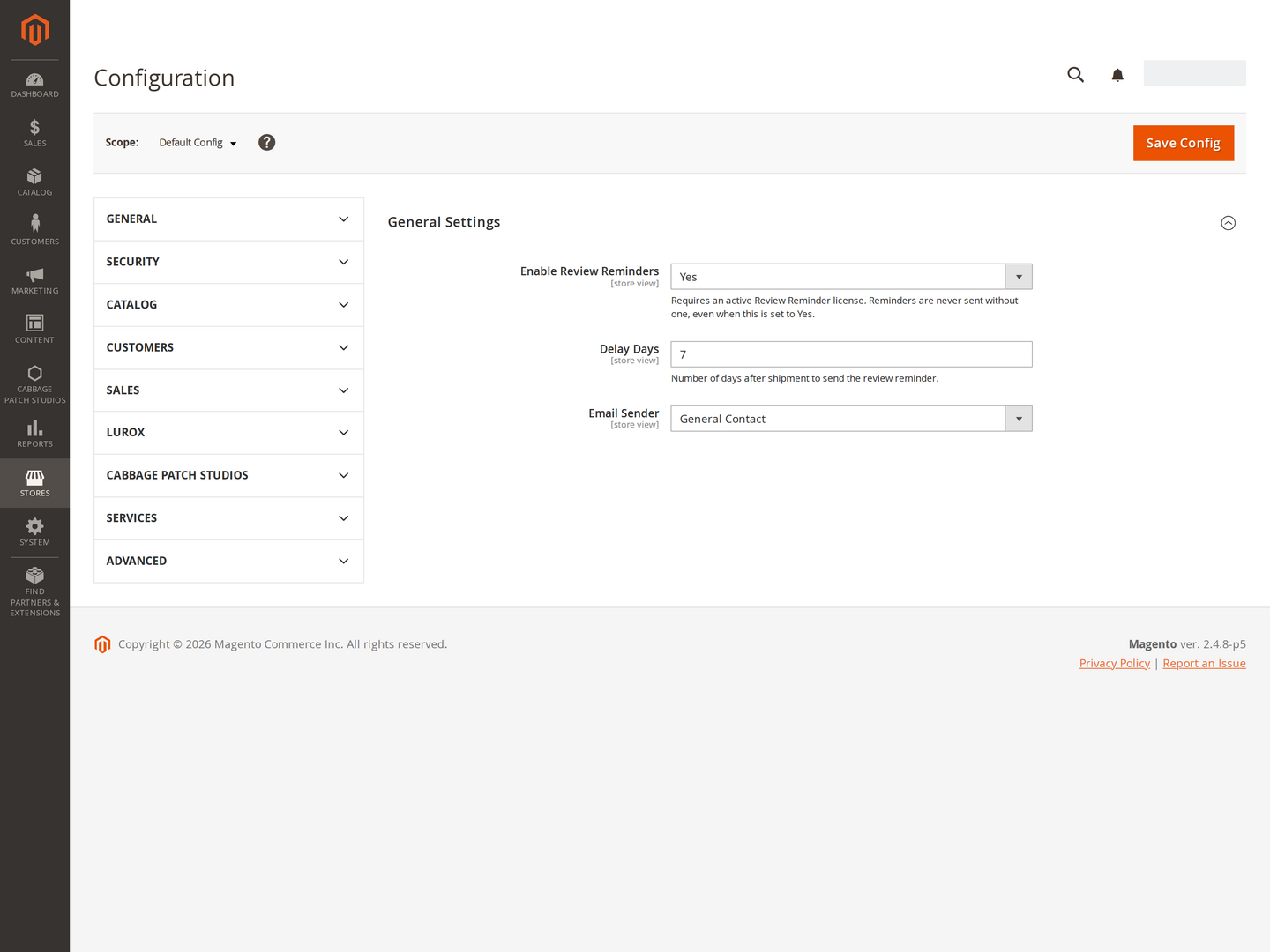
Stores → Configuration → Customers: Review Reminder (or open Customers → Review Reminder from the admin sidebar).
| Setting | What it does | Default |
|---|---|---|
| Enable Review Reminders | Master on/off for the module. Needs a valid licence to take effect — reminders are never sent without one, even when this is set to Yes. | Yes |
| Delay Days | How many days after an order ships to send its review reminder. | 7 |
| Email Sender | Which store email identity the reminder is sent from (General, Sales, and so on). | General |
Every setting is scope-aware (default / website / store), so timing and sender can differ per store.
Your licence key lives separately, under Stores → Configuration → Cabbage Patch Studios → Licensing → CPS Review Reminder License (website scope).
Setting up & checking it works
- Enter your licence key for the website under Licensing → CPS Review Reminder License, and use Revalidate to confirm the status shows active.
- Open Customers: Review Reminder and set Enable Review Reminders to Yes.
- Set Delay Days to suit your fulfilment times (7 is a good starting point) and choose the Email Sender.
- Place a test order and ship it — this schedules a reminder that many days out.
- To see the email itself without waiting, set Delay Days to
1on a test store, ship a test order, and let the next daily run deliver it.
Nothing scheduled? Check the licence key is present and active for the website, and that the feature is enabled — with no valid licence the module schedules and sends nothing by design.
FAQ
When exactly is the email sent? A background task runs once a day and sends every reminder that has reached its send date, so a reminder goes out on (or just after) the morning of its scheduled day.
Will a customer ever get more than one? No. Each order schedules exactly one reminder, and anyone who unsubscribes is never emailed again.
Do customers need an account to unsubscribe? No. The unsubscribe link works on its own, secured by a unique token in the link — one click opts them out.
Which orders count? Reminders are scheduled when an order ships, so only fulfilled orders are ever reminded.
What happens if my licence lapses? The module goes silent — no new reminders are scheduled and none are sent — with nothing broken on your store.
Will it work on my theme? Yes. The reminder is a standard transactional email and the unsubscribe page is server-rendered, so it works regardless of your storefront theme.
Changelog
This guide is itself a Lurox page. Every revision is a published version in Lurox’s built-in content history, so we can roll it back at any time. The public changelog below tracks what changed and when.
6 July 2026
- Initial publication: what it does, how it works, licensing, configuration, setup and FAQ.
Explore the rest of the library
Browse every Cabbage Patch Studios user guide in one place.
All User Guides