

PDF Invoices User Guide
Branded invoices, packing slips and credit memos — your logo, colours, font and company details on every document Magento generates.
What the PDF Invoices module does
PDF Invoices replaces Magento’s plain, unbranded default PDFs with custom-branded versions of the documents your customers actually receive — invoices, packing slips (shipments) and credit memos. Your logo, company details, colours and font go on every page, so the paperwork looks like it came from your store rather than a stock Magento install.
It’s a backend-only module — there is nothing to place on your storefront. The PDFs are generated server-side using the self-hosted Zend_Pdf engine (the same engine Magento core uses for its own documents), running on PHP 8.4, so there are no external services and no extra libraries to install.
It’s freemium. The Free tier gives you a fully branded invoice PDF — logo, company and tax details, your colours, your font and an itemised SKU column. Pro ($199, per website) extends the same branding to shipment and credit-memo PDFs, adds per-store-view branding, product images in the line rows, and the ability to auto-attach the generated PDF to the matching transactional email.
Getting started
PDF Invoices is a backend module, so everything lives in the Magento admin. Once it’s installed and enabled there is nothing to add to your theme or storefront.
Enable & configure
Go to Stores → Configuration → Cabbage Patch Studios → Sales: PDF Invoices and turn it on. The configuration screen is grouped into a few sections:
- Branding — upload your logo, and set your company name, address, phone, email, tax number and VAT ID. These appear in the document header/footer on every generated PDF.
- Layout — choose the font family (Helvetica, Times or Courier), the base font size, and your primary and accent colours. You can also toggle the SKU column and, on Pro, the product image column in the line-item table.
- Email attachment (Pro) — toggles to attach the branded PDF to the invoice, shipment and credit-memo emails independently.
Entering your Pro licence key
The Free tier comes with its own free key, which registers your install rather than unlocking anything. To unlock Pro, enter your per-website licence key at Stores → Configuration → Cabbage Patch Studios → Licensing → CPS PDF Invoices License, then click Revalidate. Licensing is per website (one domain per key), set at website scope. Feature gating reads a cached licence response with a durable database fallback, so a cache flush never silently drops you back to Free.
What the branded PDFs look like
Every document gets the same treatment: your logo in the header, your company and tax details, your primary and accent colours applied to headings and the line-item table, and your chosen font throughout. The line rows carry the SKU column (Free and Pro) and, on Pro, a small product image so the document reads at a glance.
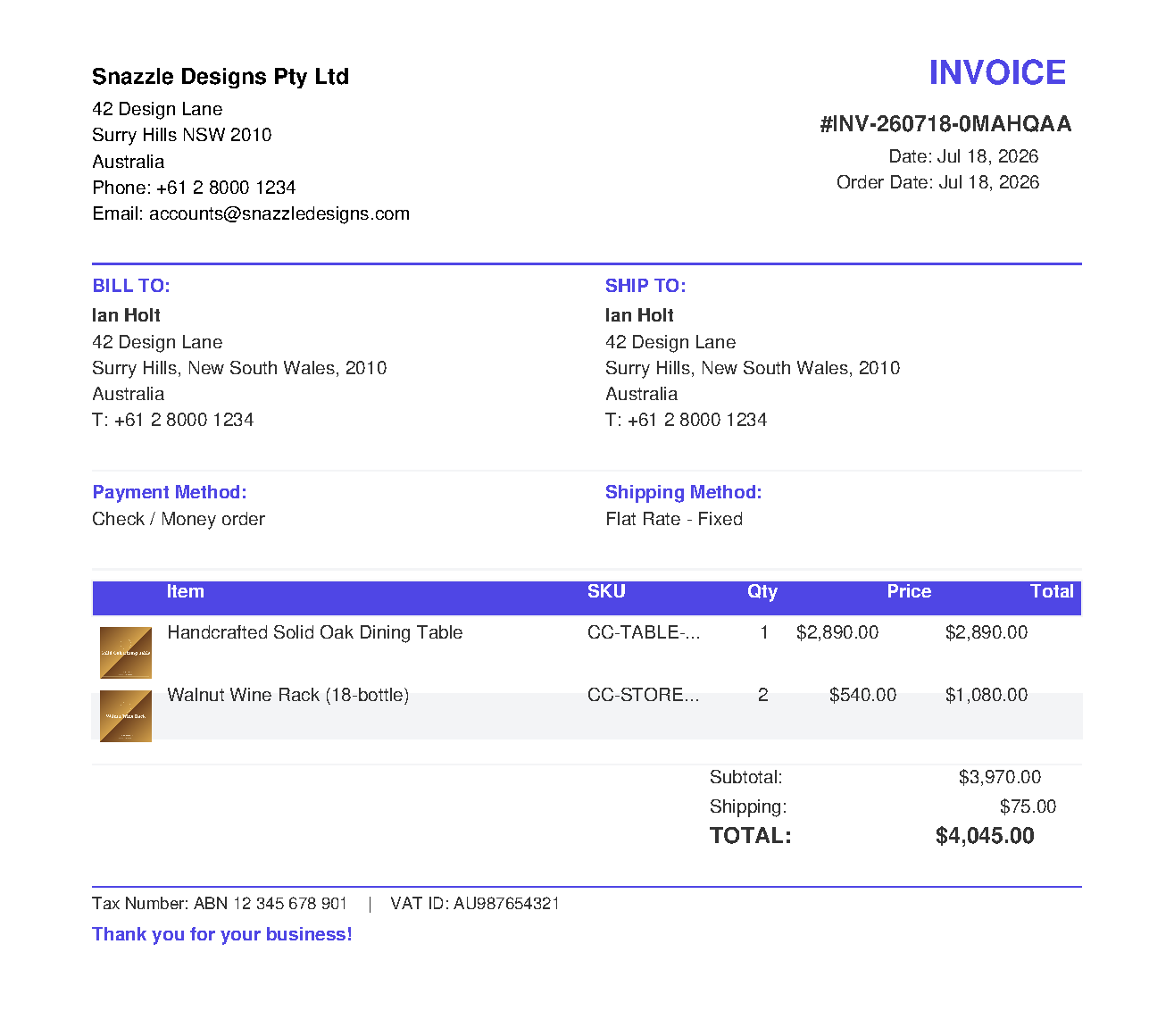
The Free tier brands the invoice. Pro extends the identical look to the packing slip (shipment) and the credit memo, adds product images to the rows, and lets each store view carry its own branding — useful when one Magento install runs several storefronts with different identities.
Printing invoices, packing slips & credit memos
There is no separate workflow to learn. Use Magento’s normal admin actions and the branded PDF is produced automatically in place of the stock one:
- From a single document — open an invoice, shipment or credit memo and click Print.
- In bulk — select rows in the Invoices, Shipments or Credit Memos grid and use the mass action (for example Print Invoices). Every PDF in the batch is branded.
If the module is disabled, or you’re on Free and print a shipment or credit memo, Magento’s stock PDF is generated instead — the action always produces a valid document.
Attaching PDFs to emails (Pro)
On Pro you can have the branded PDF attached automatically to the transactional email that already goes out for each document. The three toggles on the configuration screen — attach to invoice, shipment and credit-memo emails — are independent, so you can, say, attach the invoice but not the packing slip.
Notes & compatibility
Themes. PDF Invoices generates its documents server-side with Zend_Pdf, so the output is completely independent of your storefront theme. It runs identically on Luma, Hyvä and Lurox (and any other theme) — there is no storefront markup and no JavaScript involved. All of its surface is in the Magento admin.
Fall-through. Disabling the module, or requesting a Pro-only document type on the Free plan, cleanly hands back to Magento’s stock PDF generator — no errors, no missing documents.
Changelog
This guide is itself a Lurox page. Every revision is a published version in Lurox's built-in content history, so we can roll any guide back to an earlier version at any time. The public changelog below tracks what changed and when.
19 July 2026
- Initial publication: enabling and configuring branding, layout and email-attachment options, entering the Pro licence key, what the branded invoice / packing-slip / credit-memo PDFs look like, printing single and bulk documents, and auto-attaching PDFs to transactional emails.
Explore the rest of the library
Browse every Cabbage Patch Studios user guide in one place.
All User Guides