
Stop form spam. Invisibly. Free.
Honeypot sets an invisible trap on your Magento forms — contact, registration, login, newsletter and checkout. Bots walk right into it; real customers never see a thing. No CAPTCHA, no cookies, no friction — and it's free.

Form spam is quiet, constant, and someone on your team pays for it.
Fake registrations, junk contact enquiries, bot newsletter signups and spam orders don't just clog your inbox — they poison your customer data and hide the real enquiries in the noise. And the usual fix, a CAPTCHA, taxes your real customers with a puzzle on every form.
Honeypot stops the bulk of automated spam silently — an invisible trap only bots fall for — so your customers never see a thing and your team stops cleaning up. Free, for every store.
Spam protection your customers never feel.
Invisible to your customers
No puzzles, no checkboxes, no "select every traffic light." Real shoppers never see a thing — bots walk into a trap they can't detect.
No CAPTCHA, no friction
Nothing to solve means nothing to abandon. You stop spam without adding a single click to checkout, registration or contact.
Guards every form that matters
Contact, registration, login, newsletter and checkout — each protected independently, with a log of every bot it catches.
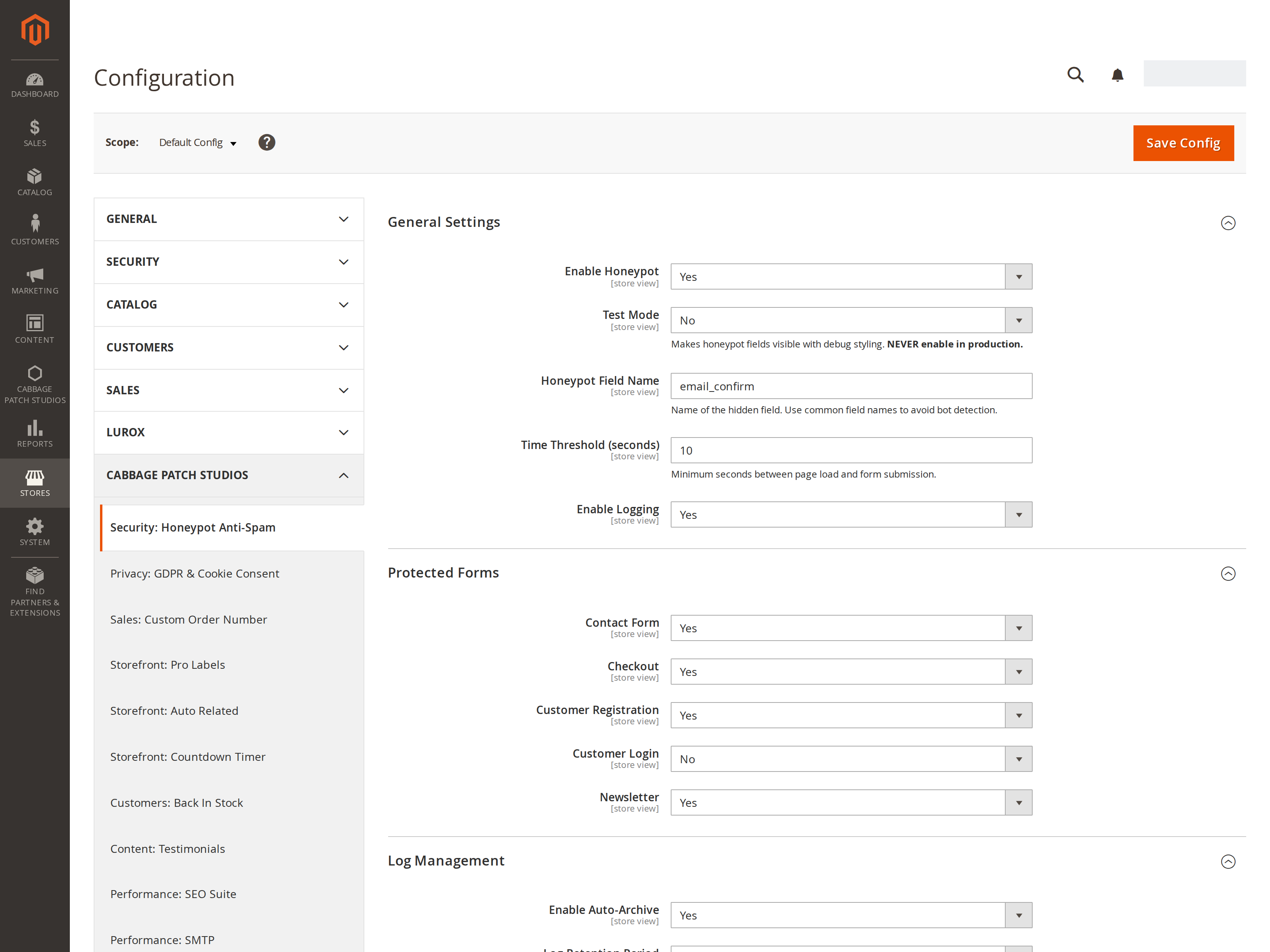
Protect every form, on your terms.
Turn honeypot protection on for exactly the forms you want. Each one is an independent switch, so you cover the spam magnets without touching anything else — and sensible defaults mean you're protected the moment it's installed.
- Contact, customer registration, login, newsletter & checkout
- Each form enabled or disabled on its own
- Checkout is guarded server-side; the rest via a tiny injected field
- Configurable per store view — protect one storefront or all of them
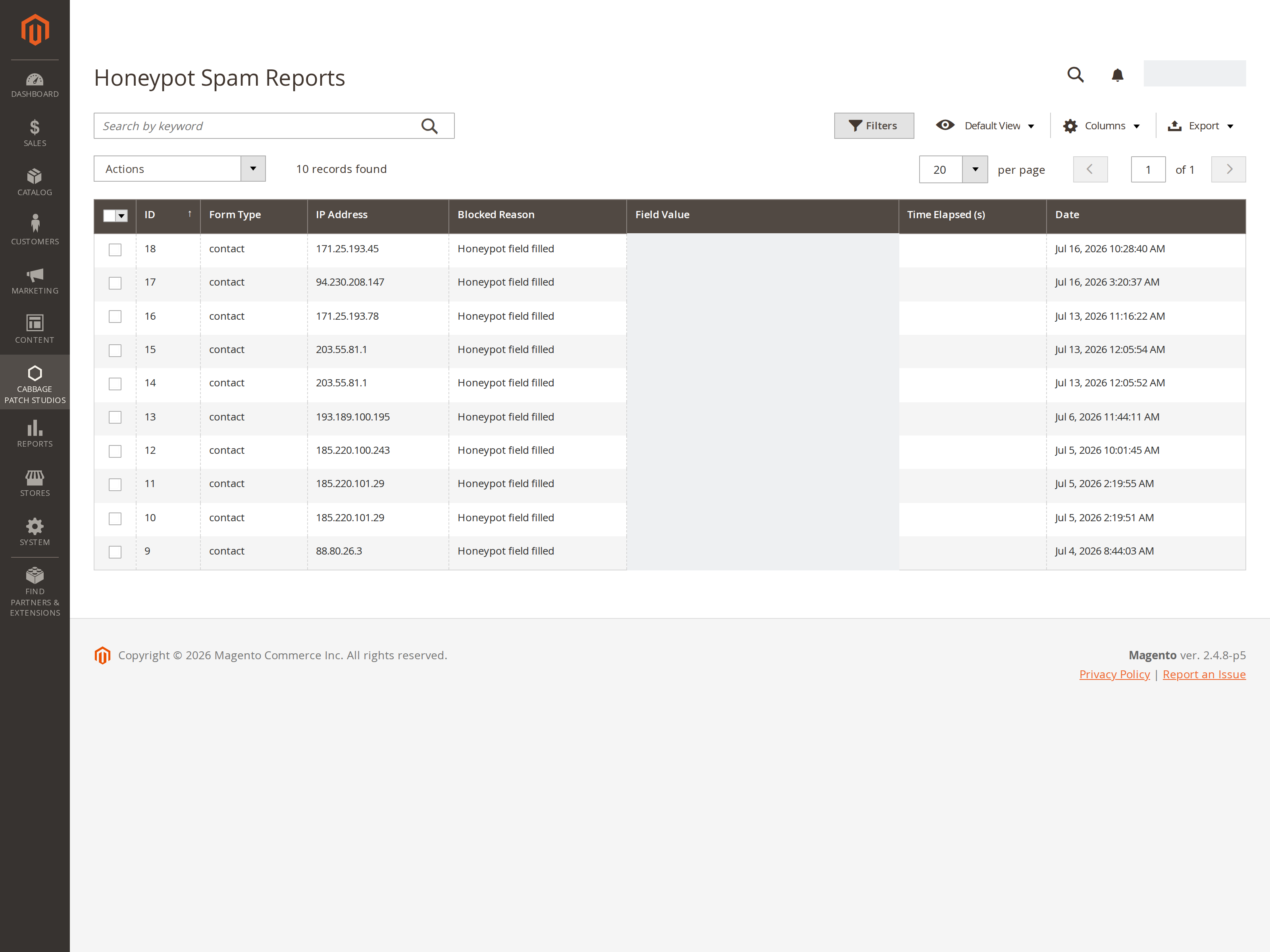
Every bot it stops — logged and provable.
When the honeypot catches a bot, it records the attempt — the form, the IP, the value the bot dropped into the hidden field, and the exact time. Your spam-report log is the receipt: living proof the protection is working, and a paper trail if you ever need to trace a source.
Two layers a bot can't beat.
A hidden trap field
An invisible field is added to your forms. Humans never fill it; bots that auto-complete every field give themselves away — and are blocked on the spot.
A too-fast tripwire
Bots submit in milliseconds. A configurable time threshold blocks anything sent faster than a human could type — and a missing timing token fails open, so real users are never caught.
Logged and reported
Every blocked attempt is recorded — form, IP, user agent, reason — in a filterable admin report with CSV export, auto-archived and pruned on your schedule.
The forms you protect, and the trap you set.


How to stop form spam in Magento 2 without CAPTCHA
- Install Honeypot (free) and go to Stores → Configuration → CPS → Honeypot.
- Set Enable to Yes. Sensible defaults mean the standard forms are protected the moment it's on.
- Under Protected Forms, toggle contact, registration, login, newsletter and checkout to match your store (login ships off).
- Save. Bots that fill the hidden field or submit too fast are now blocked — invisibly, with no puzzle for your customers.
How to tune the honeypot trap and review blocked spam
- In General Settings, rename the hidden field to dodge bot fingerprinting, and set the time threshold — the minimum seconds a genuine submission takes.
- Turn on logging to record every blocked attempt with its form, IP, user agent and reason.
- Review the catches in the admin report, filter them, and export to CSV.
- Set auto-archive and a retention period so old logs are cleaned up on your schedule. Use test mode to make the trap visible while you verify it.
Every setting is per store view — protect one storefront or all of them from one install.
Why it matters
Spam is a tax on your team.
Every fake signup, junk enquiry and bot order is time someone has to clean up — and noise that hides your real customers. Honeypot stops the bulk of it silently, for free, before it ever reaches your inbox or your database.
Get it freeWhy merchants switch
The CAPTCHA way vs Honeypot
The CAPTCHA way
- Shoppers solve puzzles to prove they're human
- Friction on every form — some just give up
- Loads a third-party script and its cookies
With Honeypot
- Invisible — customers never see or do anything
- Zero friction, zero abandonment added
- No third-party scripts, no cookies, self-hosted
Why merchants pick Honeypot
Invisible, not annoying
Unlike a CAPTCHA, there is nothing for a real customer to see, solve or abandon — the trap is invisible and only bots fall for it.
Free, forever
Real spam protection at $0 for every store — no trial clock, no per-form fee, no upsell. Create a free account to download and it keeps working, keyless.
Self-hosted & private
No third-party script, no external call and no cookie — just a hidden field and a timestamp. Nothing about your customers leaves your store.
Safe by design
A missing timing token fails open — Honeypot would rather let a submission through than risk blocking a real customer.
Receipts for every block
A filterable admin report of blocked attempts with CSV export, auto-archive and scheduled cleanup — so you can see exactly what it's stopping.
Any theme, multi-store
Works on Luma, Hyvä and Lurox with no core changes, and every setting is scoped per store view.
Free, forever
Real spam protection, $0.
Free for every store. Create a free account to download — no card, no catch.
Honeypot Anti-Spam
Free forever- Two-layer honeypot — hidden field + time threshold
- Protects contact, registration, login, newsletter & checkout
- Silent to customers — no CAPTCHA, no cookies
- Blocked-attempt logging with filterable reports & CSV export
- Auto-archive & scheduled log cleanup
- Works on Luma, Hyvä & Lurox · multi-store
The details.
Two layers
Hidden field + time threshold.
Zero friction
Invisible; no CAPTCHA, no cookies.
Logged
Reports + CSV, auto-archived.
Any theme
Luma, Hyvä & Lurox · multi-store.
Release history
Actively maintained — every entry maps to a real release.
Questions, answered.
CAPTCHA asks real people to prove they're human, adding friction (and a third-party script and cookies). A honeypot does the opposite — it sets an invisible trap that only bots fall for, so your customers see and do nothing. Many stores run both: honeypot silently removes the bulk of automated spam, so reCAPTCHA (if you use it) has far less to score.
It's built not to. The trap field is off-screen and marked so humans, screen readers and autofill leave it alone, and if the timing token is missing it fails open — it allows the submission rather than risk a false block. Only a filled trap field or an impossibly fast submission is stopped.
Contact, customer registration, customer login, newsletter and checkout — each toggled independently. Checkout is guarded server-side; the others via a tiny injected field. (Login ships off by default; turn it on if you need it.)
No. There's no third-party script, no external call and no cookie — just a hidden field and a timestamp. Checkout protection runs server-side, so there's nothing for a shopper to load or wait on.
Yes. Turn on logging and every blocked attempt is recorded — form, IP, user agent and reason — in a filterable admin report with CSV export. Logs auto-archive and prune on the retention period you choose (7 to 90 days).
It's free, forever, for every store. You create a free Cabbage Patch Studios account to download it — no credit card — and it keeps working whether or not you register a key.
Need spam protection we don't ship?
Honeypot covers the standard Magento forms out of the box. If you need something more — a custom form protected, a rate-limit rule, an allow-list, or a feed of blocked attempts into your own logging stack — tell us about your store and we'll scope it, usually within one business day.
We build these alongside Honeypot, so you keep the invisible protection and add exactly what you need.
Trap the bots. Spare your customers.
Invisible, two-layer honeypot spam protection for Magento 2 — no CAPTCHA, no cookies, no friction. Free for every store, live in minutes.
Get it free