
Make every deal — impossible to miss.
Automatic Sale, New, Featured and Out-of-Stock badges from data you already have — plus custom labels you design yourself, and one-off badges you generate with AI on your own OpenAI key. Three ways to label, one module, zero manual tagging. A one-time $139 licence, no subscription.

Your best offers are hiding in plain sight.
A sale price nobody notices barely moves. A new arrival buried in the grid looks like everything else. And the old way of fixing it — pasting a "SALE" image onto each product, then remembering to strip it off when the promo ends — is slow, error-prone, and looks different on every card.
Pro Labels makes the badge automatic: one rule covers every product on sale, the badge appears and disappears with the dates, and — when you need something bespoke — you design or generate a custom label without touching a single product.
Three ways to label. One module.
Automatic
Sale, New, Featured and Out-of-Stock badges appear on their own — driven by special price, new-from/to dates, live stock and category or attribute. Set the rules once; never tag a product again.
Custom
Design your own labels — text, colour, shape, position and size — and target them by category, attribute, customer group or store. Upload your own badge image and reuse it across the catalogue.
AI-generated
No artwork? Describe the badge you want and generate a premium, on-brand image with AI — on your own OpenAI key — then drop it straight onto a custom label. Entirely optional.

Badges from data you already have.
This is the everyday, handled. Turn on the four automatic types and Pro Labels reads your own catalogue data to decide which badge each product gets — no tagging, no maintenance.
- Sale — from the special price; the
{discount}placeholder fills in the exact % off automatically. - New — from each product's new-from / new-to dates.
- Out of Stock — from live stock status and quantity.
- Featured — from category membership or a boolean attribute.
Labels render server-side on the product image, so there is no layout shift and no flash of an unstyled badge.

Automatic covers the everyday. Custom covers everything else.
When you need something specific, the Custom Labels grid lets you build exactly the badge you want — and manage them like any other Magento entity.
- Badge text, background & text colour, shape, position and size.
- Target by category, attribute, customer group or store — with per-label conditions (match all or any).
- Upload your own PNG, JPG or GIF badge image.
- Duplicate any label to spin up a variant in seconds.
From a prompt to a premium badge
Badges you can dream up.
Every badge below was generated by Pro Labels' AI from a short text prompt — on your own OpenAI key — then dropped onto a custom label. Your artwork, on your brand, in seconds. No designer, no stock art, no CPS bill.


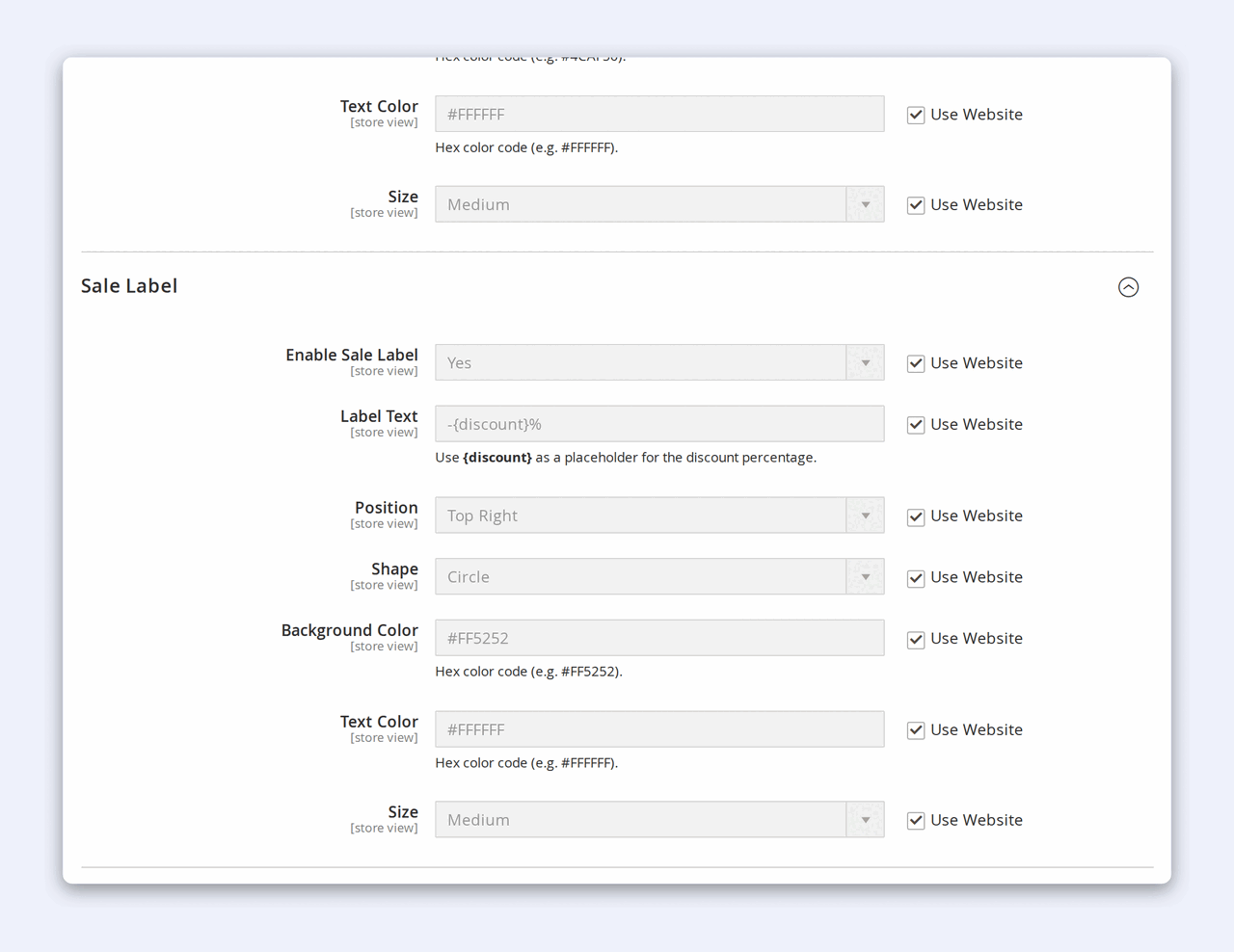
Set the rules once, in one screen.
The automatic types live in one config screen. Turn Pro Labels on, decide where labels show, switch on the types you want, and style each one — all without leaving Stores → Configuration.
- Show on category pages and show on product pages — each a separate on/off toggle.
- Per type: label text, position, shape, background & text colour, and size.
- AI Badge Generation — paste your own OpenAI key (stored encrypted) to enable the "Generate Badge with AI" button on the custom-label form.
Every setting is store-view scoped, so different stores can run different rules from one licence.
Style every label to match your brand — not a plugin's defaults.
Four shapes
Corner ribbon, rounded pill, circle or rectangle — chosen per label.
Nine positions
Drop any label into any corner, edge or the centre of the product image.
Your exact colours
Background and text colour per label — hex-exact to your brand palette.
Three sizes
Small, medium or large — tuned for grid thumbnails or PDP hero images.
The storefront, the grid, and the setup.
How to add automatic sale & new labels in Magento 2
- Install Pro Labels and activate your licence for the website.
- Go to Stores → Configuration → Storefront: Pro Labels.
- Set Enable Pro Labels to Yes, and choose whether labels show on category pages, product pages, or both.
- Open the Sale Label group, enable it, and set its text — use
{discount}to show the exact percentage off. Do the same for New, Out of Stock and Featured. - Save. Every matching product now wears its badge automatically — no tagging.
How to create a custom (or AI-generated) product label
- Go to Marketing → Pro Labels → Custom Labels and click Add New Label.
- Set the badge text, colours, shape, position and size — or upload your own PNG/JPG image.
- No artwork? Enable AI generation with your own OpenAI key, then click Generate Badge with AI and describe the badge you want.
- Add targeting — category, attribute, customer group or store — with conditions matching all or any.
- Save. Duplicate the label any time to make a variant in seconds.
Custom labels are store-view aware — one licence covers every store view on your domain.
See it live
Watch the labels work on a real store.
Automatic, custom and AI-generated badges — live on a real Magento 2 catalogue, rendered server-side on real product images. No sandbox, no mockups.
View the live demo →Why merchants switch
The old way vs Pro Labels
The old way
- Hand-add a "SALE" image to each product
- Forget to remove it when the promo ends
- Badges look different across the catalogue
- Bespoke artwork means a designer and a wait
With Pro Labels
- One rule covers every product on sale
- Badges appear & disappear with the dates, automatically
- One consistent, on-brand style everywhere
- Design or AI-generate a custom badge in seconds
Why merchants pick Pro Labels
Automatic AND custom
The manual-only label builders make you build every badge by hand. Pro Labels ships four automatic types as the moat — then adds the full custom builder on top.
AI on your own key
Generate premium badge art from a text prompt on your own OpenAI key. CPS never sees the key and never bills for generation — you pay OpenAI directly, if at all.
Own it, don't rent it
A perpetual licence per domain — one price, no monthly fee. Your labels don't switch off when an invoice lapses.
On-brand, not generic
Four shapes, nine positions, hex-exact colours and three sizes — on the auto types and every custom label, so nothing looks like a bolted-on plugin.
No layout shift
Labels render server-side on the product image — no flash of unstyled badge, no CLS hit to your Core Web Vitals.
Multi-store aware
Per-store types, styling and targeting, and one licence that covers every store view on the domain.
One simple licence
Premium labels, one price.
Licensed per domain. Perpetual — your licence never expires.
Pro Labels
Pro- All four automatic types — Sale, New, Out of Stock, Featured
- Auto discount % on Sale labels via {discount}
- Custom labels — design, upload or AI-generate your own
- Targeting by category, attribute, customer group or store
- Full styling — four shapes, nine positions, colour, size
- Category + product pages · multi-store · server-rendered
- 12 months of updates & support
- 30-day money-back guarantee
Specifications
Platform
Magento 2.4.8+ (Community & Adobe Commerce) · PHP 8.4
Where it shows
Category grids + product pages — each a separate toggle
Automatic types
Sale · New · Out of Stock · Featured — from your catalogue data
Custom & AI
Admin CRUD grid · image upload · AI on your own OpenAI key
Styling
Four shapes · nine positions · hex colours · three sizes
Rendering
Server-side on the product image — no layout shift
Scope
Per store view — types, styling & targeting; multi-store aware
Licensing
Per website (one domain per key) — perpetual, plus updates
Release history
Actively maintained — every entry maps to a real release.
Questions, answered.
No. Pro Labels detects Sale, New, Out-of-Stock and Featured products automatically from data your catalogue already holds — special price, new-from/to dates, stock status, and category or attribute membership. Set the rules once and the badges maintain themselves.
Yes. The Custom Labels grid lets you build any badge you like — your own text, colours, shape, position and size — and target it by category, attribute, customer group or store. You can upload your own badge image, and duplicate a label to make a variant.
When you don't have artwork, describe the badge you want and Pro Labels generates a premium image with AI, ready to drop onto a custom label. It runs on your own OpenAI API key, stored encrypted, so you stay in full control of usage and cost — Cabbage Patch Studios never sees the key and never bills you for generation. It's entirely optional; leave it off and everything else works as normal.
Yes. Use the {discount} placeholder in the Sale label text and it calculates the exact % off from the special price automatically.
On category grid listings and product detail pages — each is a separate on/off toggle. They're rendered server-side on the product image, so there's no layout shift and no flash of an unstyled badge.
Luma and Lurox themes, and any theme that renders products through Magento's standard product-image block — including Hyvä. It's a one-time $139 perpetual licence per domain, not a subscription, with 12 months of updates and a 30-day money-back guarantee.
Need a label rule we don't ship?
Pro Labels covers the four automatic types and a full custom builder out of the box.
If you need something bespoke — dynamic label text, a custom shape, per-tier-price or per-attribute rules — tell us about your store and we'll scope it, usually within one business day. We build these on top of Pro Labels, so you keep the automatic engine and add exactly the logic you need.
Give every product the badge it deserves.
Automatic, custom and AI-generated labels for Magento 2 — three ways to make every product stand out, from one module and a one-time $139 licence.
Buy Pro Labels — $139