
Order numbers that look like a real business.
Magento numbers your first order 000000001 and counts straight up — telling every customer, and every competitor, exactly how many orders you've had. Custom Order Number replaces that with numbers you design: your prefix, your format, across orders, invoices, shipments and credit memos.
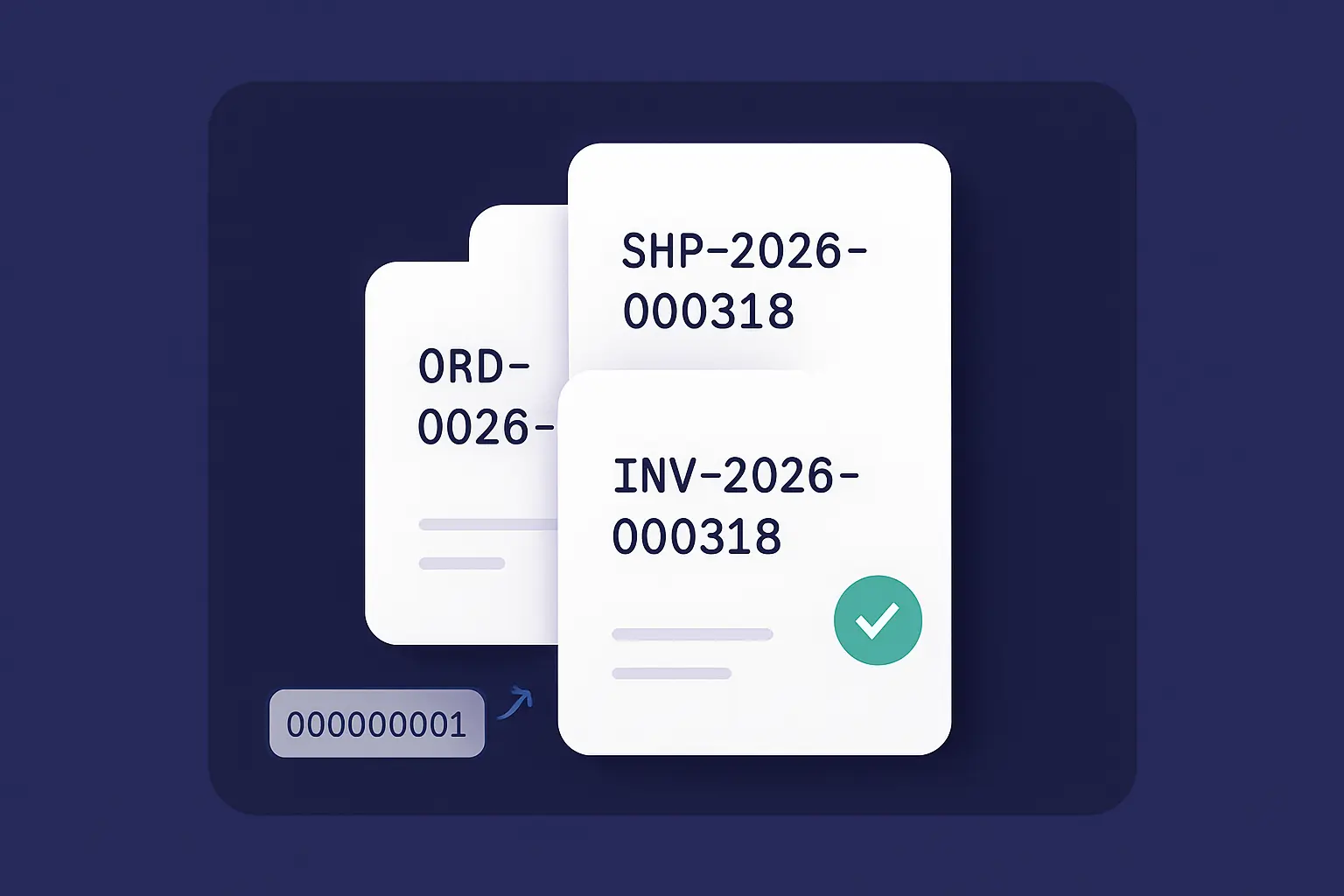
Three reasons to ditch 000000001.
Brand every document
Put your own stamp on orders, invoices, shipments and credit memos — a prefix, a year, your store code — so every number looks deliberate, not like a fresh Magento install.
Hide how many orders you've had
Sequential IDs leak your order volume to customers and competitors. Offset or scramble the counter — or go fully random — so your numbers stay unreadable while staying unique.
Never breaks a checkout
Numbers are generated inside the same atomic, row-locked transaction as the sale, so concurrent checkouts never collide — and if anything ever fails, it falls back to the native Magento ID.
![The Custom Order Number admin — an invoice prefix of INV-[yy][mm][dd] with the live "Next Numbers" preview showing the resulting INV-260719 number](/media/lurox/modules/con-config.png)
Design your number, watch it update live.
Build your number from parts — a prefix, date and store tokens, a separator, a zero-padded counter — and a live preview shows the exact next number as you type, before you save a thing.
- Prefix & suffix with [yyyy], [yy], [mm], [dd], [storeCode] & [websiteCode] tokens
- Pick a separator and zero-pad the counter to any width (1–24)
- Set the starting value and the increment step
- A live “Next Numbers” preview updates as you edit — no save required
A numbering toolkit, not a text box.
Tokens & formats
Compose numbers from a prefix, suffix, date tokens and your store or website code — for example US-2026-000318 or WEB-26-07-0042. Your format, exactly.
Obfuscate or randomise
Add a fixed offset, apply a reversible scramble, or go fully random with cryptographically secure, collision-checked numbers — so no one can read your order count off an invoice.
Reset on your schedule
Keep one continuous counter, or reset it daily, monthly or yearly — pair it with a date token for clean per-year sequences like INV-2026-0001.
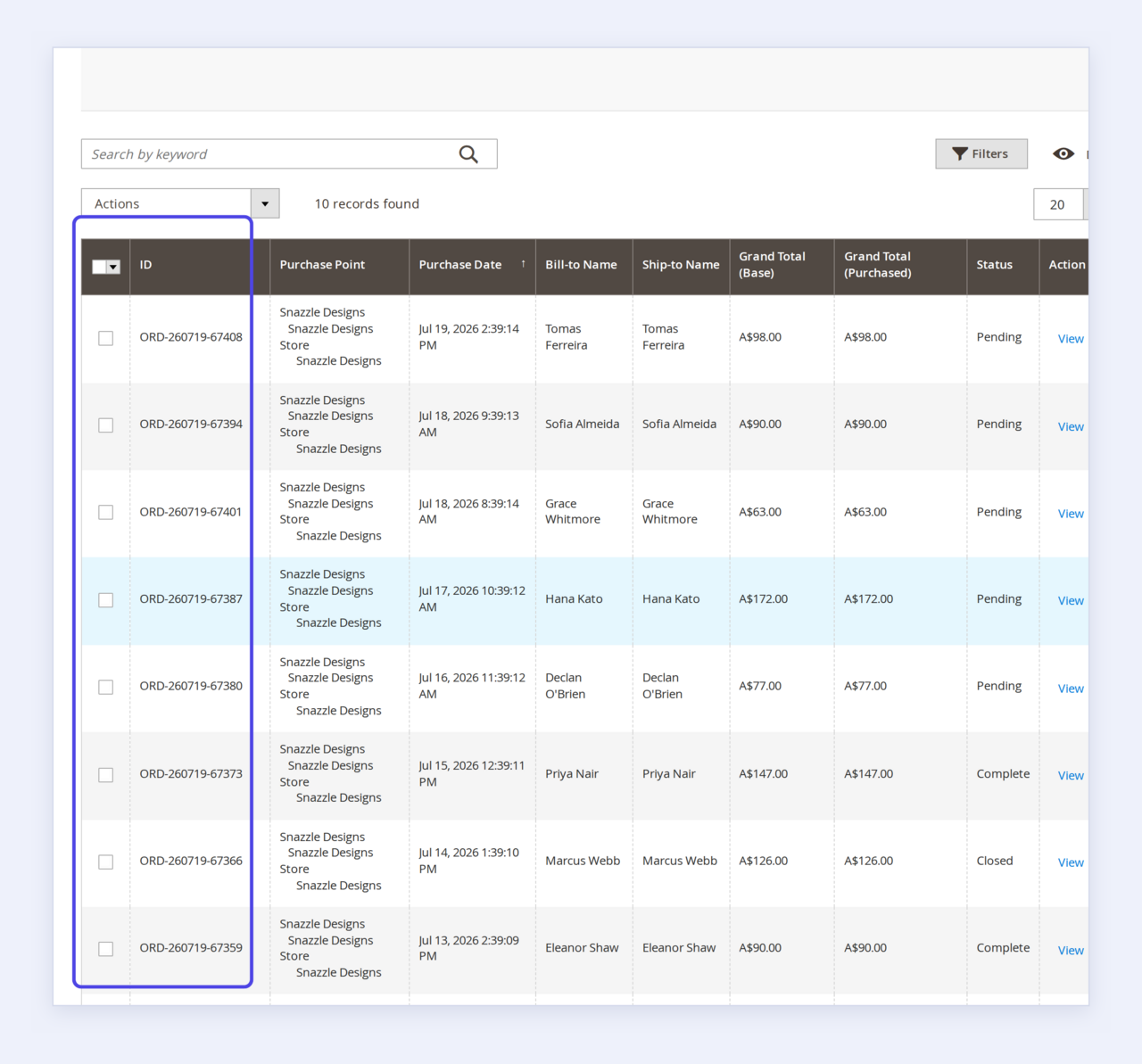
Branded numbers, right across the order grid.
The order grid is the first place your team — and every screenshot that ever leaves your building — reads your numbering. Instead of a wall of identical 000000-somethings, every row leads with your prefix, your date and your sequence.
- Your format on every order, from the very first one
- Step the counter so consecutive orders aren’t obviously consecutive
- Existing orders are untouched — only new numbers change
- Magento’s internal entity IDs stay exactly as they were
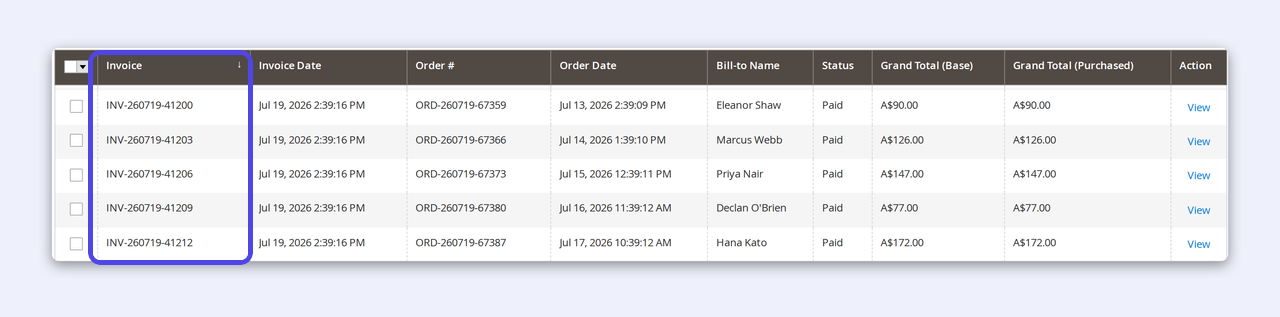
Invoices and credit memos, numbered to match.
An invoice is a document your customer keeps — and a credit memo is one they scrutinise. Give both the same considered numbering as the order, so everything you send reconciles at a glance.
- Independent INV- and CM- sequences, or inherit the order number
- Per-store-view formats — one brand per storefront
- Clean, padded counters that line up in the grid and on the PDF
- Pairs perfectly with branded PDF invoices for a complete look

Shipments and packing slips carry your number too.
The packing slip is the one document that physically travels with the parcel. When its number matches the order and invoice, your warehouse, your courier and your customer are all reading the same reference.
- SHIP- numbering on every shipment and packing slip
- Inherit the order number for one reference end-to-end
- Or run an independent shipment counter with its own format
- An append-only audit trail records every number issued
See it in the admin.
How-to
How to add a prefix to your Magento 2 order numbers
From a fresh install to your own branded format in about a minute — no code, no core changes.
- 1In the admin, open Stores → Configuration → Cabbage Patch Studios → Sales: Custom Order Number.
- 2Expand Order Numbering and set Enable Custom Order Numbers to Yes.
- 3Type your Prefix — plain text like
ORD-, or tokens such as[yyyy]and[storeCode]. - 4Watch the live “Next Numbers” preview confirm the exact format before you commit.
- 5Click Save Config. Your next order carries the new number; every existing order is left untouched.
How-to
How to stop customers reading your order volume
Sequential numbers quietly broadcast how many orders you've taken. Here's how to make the counter unreadable while keeping every number unique.
- 1In Order Numbering, find Obfuscation Mode and Random Mode.
- 2Choose Offset to shift the counter by a fixed amount —
318reads as000318, not1. - 3Or choose Scramble for a reversible disguise that still maps back to the real sequence internally.
- 4Or choose Random Only for cryptographically secure, collision-checked numbers with no visible order at all.
- 5The preview shows placeholders while you tune it; save, and your counter can no longer be read off a document.
Why it matters
The first number a customer reads.
An order confirmation, an invoice, a refund — every one leads with a number. Make it look like it came from an established business, not a day-one Magento install. Numbers you control, across every document, kept private by design.
Read the guideWhy merchants switch
Default numbering vs Custom Order Number
Magento default numbering
- Orders start at 000000001 and visibly count up
- Anyone can guess your order volume from a receipt
- Invoices and credit memos share the same plain sequence
With Custom Order Number
- Your own prefix, tokens and format on every document
- The counter is offset, scrambled or fully random
- Orders, invoices, shipments & credits, each numbered right
One simple licence
Professional numbering, one price.
Licensed per domain. Perpetual — your licence never expires.
Custom Order Number
Pro- Custom numbering for orders, invoices, shipments & credit memos
- Prefix, suffix, date & store tokens, separators, padding
- Offset, scramble or fully-random counters
- Daily / monthly / yearly counter resets
- Atomic, concurrency-safe, with native-ID fail-safe
- Audit trail + CLI preview & reset
- 12 months of updates & support
- 30-day money-back guarantee
The details.
Magento 2.4.x
PHP 8 · Community & Enterprise.
Atomic & safe
Row-locked counters; concurrency-safe.
Fail-safe
Falls back to native IDs, always.
Multi-store
Independent counters per store view.
Still shipping
Actively maintained.
A recent, honest version history — every release verified on Magento 2.4.x.
- v1.2Jul 2026Licensing refined — per-website entitlement resolution, so one licence maps cleanly to the domain it runs on.
- v1.1Jun 2026Live “Next Numbers” preview added to the admin — see your exact format resolve before you save.
- v1.0Jun 2026Custom numbering across orders, invoices, shipments and credit memos, verified on the real persistence path for Magento 2.4.x.
Questions, answered.
It replaces the increment ID — the visible number — on your orders, invoices, shipments and credit memos with a format you design. Magento's internal entity IDs are untouched, so nothing else in your store is affected.
Yes. Magento's default numbers count up from 000000001, which quietly leaks your volume. Add a fixed offset, apply a reversible scramble, or use a fully random mode (cryptographically secure, with collision checking) so your counter can't be read off a document.
No. Numbers are generated inside the same atomic, row-locked transaction as the sale, so concurrent checkouts can't collide, and random numbers are checked against existing ones. If anything ever fails, it falls back to Magento's native ID — an order is never blocked.
Yes. Each document type can inherit the order's number for one consistent reference, or run its own independent counter and format — your choice, per store view.
Yes. Every setting is scoped per store view and each store keeps its own independent counters. Tokens like [storeCode] and [websiteCode] let a single format adapt across all your stores.
One perpetual licence per domain — $179, including 12 months of updates and support, with a 30-day money-back guarantee.
Need a numbering rule we don't ship?
Custom Order Number covers prefixes, tokens, padding, obfuscation, random modes and scheduled resets out of the box. If you need something bespoke — a per-country sequence, a checksum digit, syncing numbers to an external ERP, or a specific legal invoice format — tell us about your store and we'll scope it, usually within one business day.
We build these on top of Custom Order Number, so you keep the engine and add exactly the format you need.
Give your orders a professional number.
Custom order, invoice, shipment and credit-memo numbers for Magento 2 — your format, your brand, with your order volume kept private. Set it once and every document looks the part.
Buy Custom Order Number — $179