

GDPR & Cookie Consent User Guide
Consent that actually blocks scripts, customer data-rights requests, and an admin console with a DSAR workflow and one-click right-to-be-forgotten.
What the GDPR module does
The GDPR & Cookie Consent module is a complete, self-hosted consent and data-rights toolkit for Magento 2. It ships seven working features: a cookie-consent banner that actually blocks scripts before consent (external and inline), customer data-export and deletion requests, a consent audit log, an admin consent-log console, a DSAR workflow, secure export delivery, and an extended right-to-be-forgotten. Everything runs inside your store — no third-party consent SaaS, no per-pageview fees, no shopper data leaving your infrastructure.
It's freemium. The Free tier ships the banner, script blocking, the customer request forms and the audit log. Pro ($129, per website) unlocks the admin oversight: the consent-log console, the DSAR workflow, secure export delivery and the extended erasure.
Enabling the module
Once the module is installed and enabled, its settings live under Stores → Configuration → Cabbage Patch Studios → GDPR. Your Free key registers the install but is never required to run; enter a per-website Pro key at website scope to unlock the Pro features (see Licensing).
The consent banner
The banner is static-first: it renders as real HTML and the accept / reject controls work even with JavaScript disabled, so consent is never dependent on a script loading. Where Alpine is present (Hyvä, Lurox, or any Alpine-aware theme) the show/hide and preference toggles are enhanced on top.
- Cookie categories — group scripts (analytics, marketing, functional) so shoppers can accept or reject by purpose, not just all-or-nothing.
- Banner copy — edit the heading, body and button labels to match your store's voice and legal wording.
- Consent versioning — bump the consent version to force a fresh consent prompt for every shopper (for example after you change which trackers you run). Prior consent is recorded against the version it was given under.
Script & tag blocking
This is the part most cheap "cookie" extensions get wrong. A banner that doesn't gate the scripts isn't consent — the trackers have already fired. The GDPR module holds analytics, marketing and tag-manager scripts until the shopper consents, and it covers both shapes:
- External scripts —
<script src="…">tags (Google Analytics, Meta Pixel, Google Tag Manager and the like) are held until the matching category is accepted. - Inline snippets — inline
gtag()/fbq()calls are held too, not justsrc=tags. This is the gap most banners miss.
You can extend the block list with your own keywords/patterns so bespoke or third-party tags you add later are gated the same way.
Customer data requests (DSAR)
Shoppers exercise their data rights themselves, from their account area — no support ticket required:
- Data export — the customer requests a copy of the personal data you hold. The request is recorded and (in Pro) an export is generated for secure delivery.
- Account deletion — the customer requests erasure. Depending on your configuration this can run immediately or after a grace period, giving you a window to intervene on in-flight orders.
The request forms render static-first, so they work with JavaScript disabled. Every request and every consent change is written to the audit log.
Admin oversight (Pro)
Pro turns consent and data requests into a defensible, logged process you can stand behind in an audit.
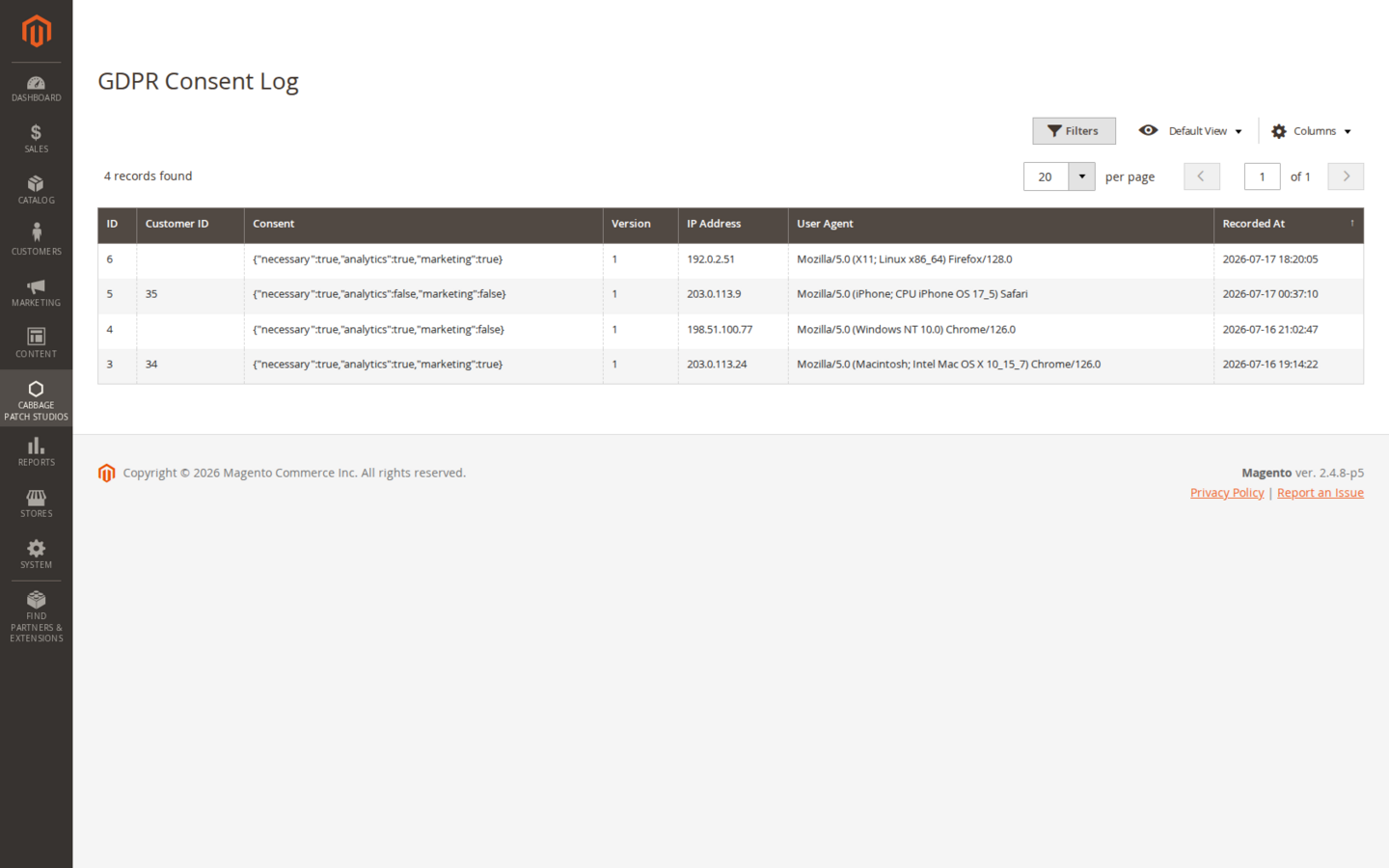
- Consent-log console — browse the recorded consent decisions (who, what category, which consent version, when) in an admin grid.
- DSAR workflow — each customer request appears in an admin grid. Open it to view the details, then process it, deny it with a reason, or download the generated export.
- Secure export delivery — exports are delivered through a controlled path rather than left in a public location.
Right to be forgotten (Pro)
Deletion in Pro is a real erasure, not a soft-delete — and it reaches beyond the customer account row. When you process a deletion, the module:
- Anonymises the customer record and the PII on their orders and order addresses;
- Removes the newsletter subscription;
- Scrubs the stored IP address and user-agent from the consent log.
The result is a defensible erasure with a record that it happened — you can show both that the data is gone and that the request was actioned.
Licensing
Pro is licensed per website (one domain per key). Set your licence key at website scope; the Free tier has its own free key, which registers your install rather than gating it — every free feature runs with no key at all. Feature gating reads a cached licence response with a durable database fallback, so a cache flush never silently drops you to Free mid-session. The licence is perpetual, with 12 months of updates and support included.
| Capability | Tier |
|---|---|
| Cookie-consent banner (static-first) | Free |
| Script/tag blocking (external + inline) | Free |
| Customer DSAR forms (export + deletion) | Free |
| Consent audit log | Free |
| Admin consent-log console | Pro |
| DSAR admin workflow (view / process / deny / download) | Pro |
| Secure export delivery | Pro |
| Extended right-to-be-forgotten (order PII + newsletter + log scrub) | Pro |
Notes & compatibility
Already running the Lurox cookie banner? Leave it in place for now. This module is fully standalone and does not depend on Lurox; automatic de-duplication between the two banners lands in v1.1. Until then, run one banner or the other on a given store to avoid showing shoppers two prompts.
Themes. The banner and the request forms are static-first, so they render on Luma, Hyvä and Lurox and degrade gracefully with JavaScript off — interactivity layers on top where Alpine is present.
Changelog
This guide is itself a Lurox page. Every revision is a published version in Lurox's built-in content history, so we can roll any guide back to an earlier version at any time. The public changelog below tracks what changed and when.
17 July 2026
- Initial publication: install, the consent banner and versioning, external + inline script blocking, customer DSAR requests, the Pro admin console and DSAR workflow, the extended right-to-be-forgotten, licensing, and the Lurox-banner de-dup note.
Explore the rest of the library
Browse every Cabbage Patch Studios user guide in one place.
All User Guides