

Back In Stock — User Guide
Capture demand on out-of-stock products and win the sale back automatically when they return.
What it does
Back In Stock adds a “notify me when available” form to your out-of-stock product pages. Shoppers leave an email; when the product is buyable again, they’re emailed automatically with a link straight back to the product. You get a clean admin grid of who’s waiting on what, and — on Pro — an analytics dashboard, send-timing control and per-customer limits.
Ships turned off. The module installs disabled. Enable it per store scope under Stores → Configuration → CPS → Customers: Back In Stock after the one-time setup below.
Before you start — the one prerequisite
Back In Stock needs out-of-stock products to stay visible so the subscribe form has a page to appear on.
Set this first. Stores → Configuration → Catalog → Inventory → Stock Options → Display Out of Stock Products = Yes. Without it, out-of-stock product pages return 404 and shoppers have nowhere to subscribe.
How subscribing works
- A product goes out of stock. On its page, where “Add to Cart” would be, shoppers see an “Email me when available” field.
- They enter an email (guest or logged-in) and submit. The form works with no JavaScript (a real form submission) and upgrades to a smooth inline experience on Hyvä / Lurox / any Alpine-aware theme.
- Their request is recorded — one row per shopper per product — and appears in the admin grid.
How restock notifications work
Back In Stock detects restocks with a background cron job (every few minutes), not a product-save event. This matters: stock usually returns through paths a save-event never sees — supplier/source updates, order cancellations, imports, the REST API. The cron checks each waiting product’s current salable stock and emails everyone waiting, then marks them notified.
On the Pro tier send timing is yours to control — see Batch delay below. The free tier notifies as soon as the next cron run sees the product back in stock.
Configuration
Stores → Configuration → CPS → Customers: Back In Stock
General
- Enable Back In Stock Notifications — turn the module on for this scope (per store).
- Email Sender — the store email identity used as the notification sender. (Pairs well with CPS SMTP for logged, deliverable mail.)
Pro Settings (require a Back In Stock Pro licence)
- Batch Delay (hours) — hold notifications this long after a restock (0 = send immediately). Smooths send volume and avoids firing on a brief stock blip.
- Subscription Limit Per Customer — cap active subscriptions per customer email (0 = unlimited).
The admin grid & the Pro dashboard
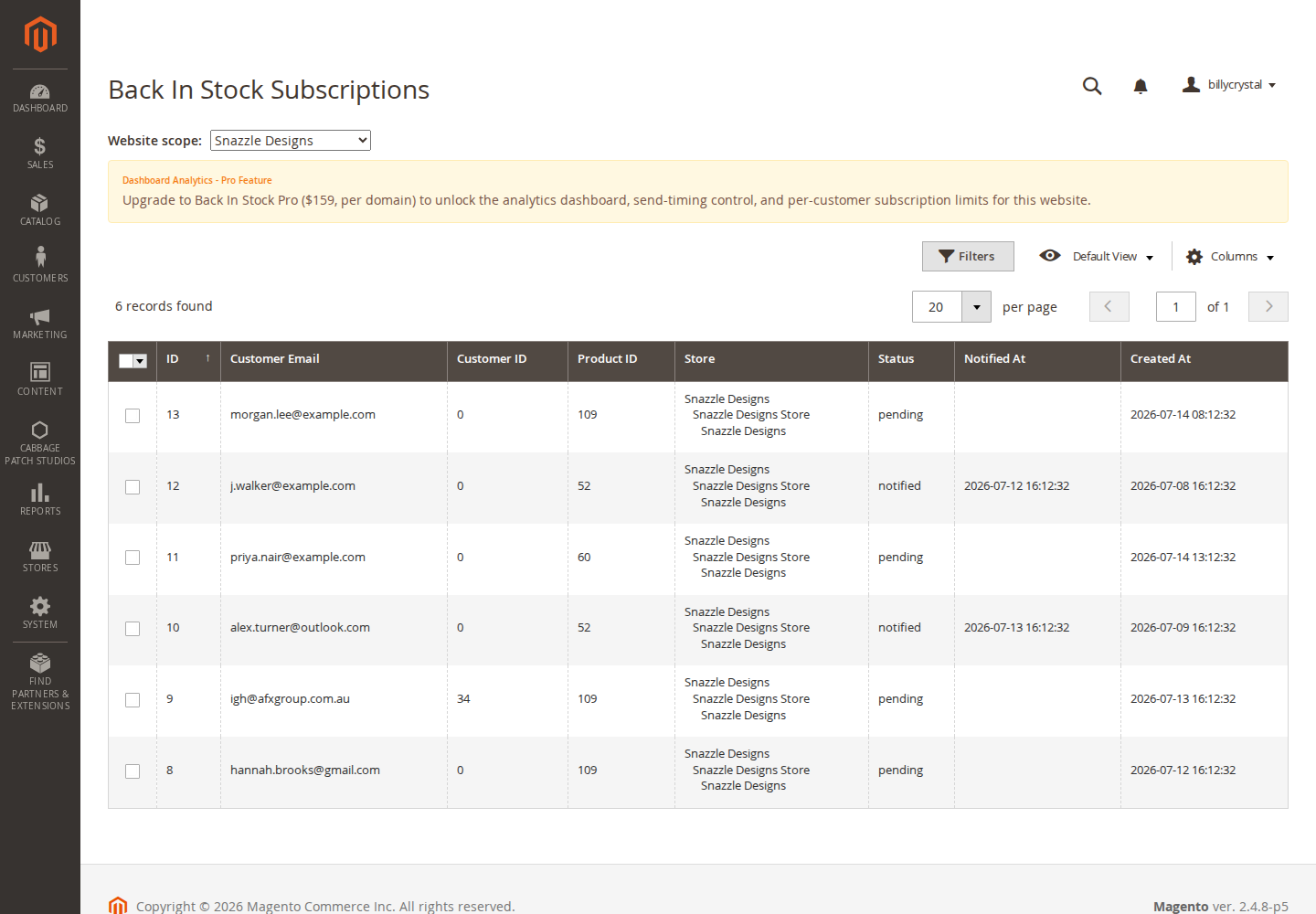
Customers → Back In Stock Subscriptions lists every pending and notified subscription: product, email, store, status and dates — your live view of unmet demand.
On Pro, the analytics dashboard shows subscribers, conversions and top-requested products for the website you select — pick the licensed website from the switcher at the top. Analytics are scoped per website, so you only ever see the stores you’ve licensed.
Licensing
- Free comes with a free registration key and runs with or without it — subscribe, auto-notify and the admin grid work out of the box.
- Pro ($159, per domain) unlocks the dashboard, batch-delay and per-customer limits. Enter the licence key at website scope under the module’s Licence section; it validates and caches per website.
FAQ
Will it notify shoppers when stock returns through Magento’s inventory, not a manual edit?
Yes — detection is cron-based and reads current salable stock, so it fires on supplier/source updates, cancellations, imports and API changes.
Do shoppers need an account?
No — guests and customers can both subscribe with an email.
Nothing sends — why?
Check: the module is enabled for that store; the product is actually back in stock; and Display Out of Stock Products = Yes so the form could be shown in the first place.
Does it work on Hyvä?
Yes — static-first, Alpine-enhanced.
Changelog
This guide is a Lurox page; every revision is a published version in Lurox’s built-in content history.
14 July 2026
Initial release: static-first subscribe form, cron-authoritative restock detection, admin grid, Pro analytics dashboard + batch delay + per-customer limit.
Explore the rest of the library
Browse every Cabbage Patch Studios user guide in one place.
All User Guides