

Abandoned Cart User Guide
Cron-authoritative abandoned-cart detection, a one-click recovery email, and a Pro system of sequences, coupons and a real recovery dashboard.
What the Abandoned Cart module does
The Abandoned Cart module recovers sales you’ve almost made. It watches for shoppers who fill a cart and leave without checking out, then emails them a one-click way back — automatically, and entirely self-hosted. Detection is cron-authoritative: a scheduled job scans your carts rather than relying on a fragile checkout script that misses half of them.
It’s freemium. The Free tier ships cron-based detection, a single recovery email (step 1) with a secure recovery link, and the Abandoned Carts admin grid. Pro ($199, per website) unlocks the system: a multi-step recovery sequence, incentive coupons on later steps, a recovery dashboard with real analytics, exclusions, and a test-send preview.
Enabling the module
Once the module is installed and enabled, its settings live under Stores → Configuration → Cabbage Patch Studios → Abandoned Cart. Your Free key registers the install but is never required to run; enter a per-website Pro key at website scope to unlock the Pro features (see Licensing). Make sure Magento cron is running — detection and email sending are both driven by the scheduler.
Detection
A scheduled cron job scans active carts and flags the ones that qualify as abandoned. Because it runs on the schedule — not in the browser at checkout — it catches carts a checkout observer would miss.
- Abandonment threshold — how long a cart must sit untouched (and unconverted to an order) before it counts as abandoned. Set it to match your customers’ buying rhythm.
- Minimum cart total — optionally ignore very small carts so you only chase the ones worth recovering.
- Secure recovery link — every flagged cart is issued a random, unguessable token. The link restores that exact cart; there’s no way to load someone else’s cart by guessing an ID.
The recovery email
The heart of the free tier: a single recovery email (step 1) sent once a cart is detected. It brings the shopper straight back to their cart, one click away, via the secure recovery link.
- Template — the step-1 email subject and body, with the recovery link and a summary of what’s in the cart.
- Sender identity — the from-name and address the recovery email is sent as. Pair it with the SMTP module for reliable delivery.
- One email per cart — the free tier sends step 1 only; the multi-step sequence is a Pro feature (see below).
Multi-step sequence & coupons (Pro)
Pro turns a single email into a recovery system. Instead of one nudge, you schedule a sequence and sweeten it when it helps.
- Steps 2 & 3 — follow-up emails sent after configurable delays, each with its own template, for carts that still haven’t converted.
- Incentive coupons — attach a coupon to a later step (for example, a small discount on step 3) to tip a hesitating shopper over the line. You control which step carries the incentive.
The recovery dashboard (Pro)
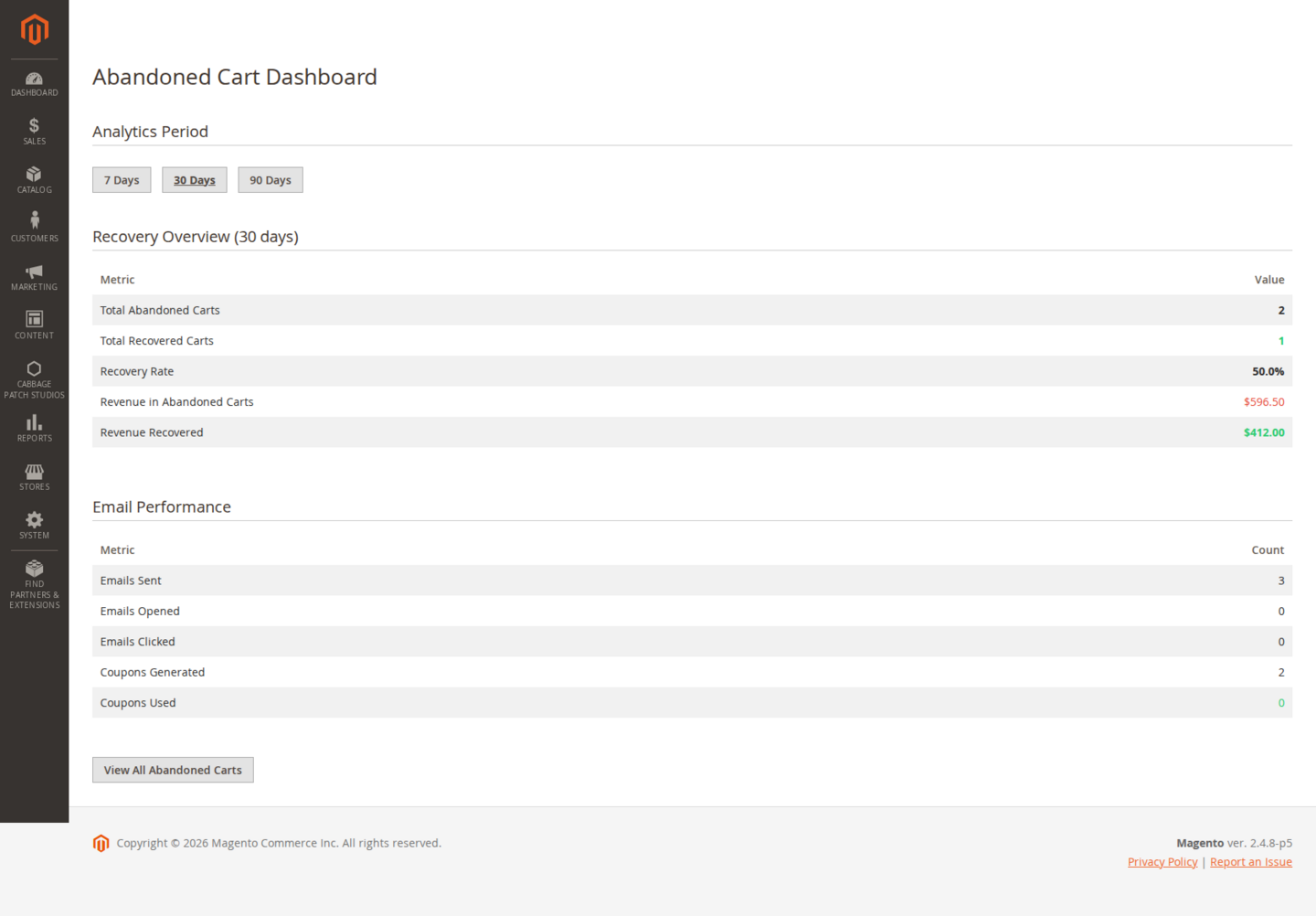
Pro adds a recovery dashboard and an email log built on real events — not estimates or projections. For each cart and each step you can see:
- Sent — recovery emails dispatched.
- Opened — opens, tracked by the email pixel.
- Clicked — shoppers who followed the recovery link back to their cart.
- Recovered — carts that went on to become completed orders.
- Coupons used — how many incentive coupons were actually redeemed.
The Abandoned Carts admin grid (available on Free too) lists every detected cart; the dashboard and log are the Pro layer that tells you what’s working.
Exclusions & test-send (Pro)
Not every cart should be chased, and you’ll want to see an email before it goes live.
- Exclusions — stop recovery for specific customer groups, products or categories — useful for wholesale accounts, made-to-order items, or anything you don’t want to discount.
- Test-send preview — send yourself a recovery email to check the template, links and sender identity render correctly before any shopper receives one.
Licensing
Pro is licensed per website (one domain per key). Set your licence key at website scope; the Free tier has its own free key, which registers your install rather than gating it. Feature gating reads a cached licence response with a durable database fallback, so a cache flush never silently drops you to Free mid-session. The licence is perpetual, with 12 months of updates and support included.
| Capability | Tier |
|---|---|
| Abandoned-cart detection (cron) | Free |
| Single recovery email + secure link | Free |
| Abandoned Carts admin grid | Free |
| Multi-step sequence (steps 2 & 3) | Pro |
| Incentive coupons on later steps | Pro |
| Recovery dashboard + email log (real analytics) | Pro |
| Exclusions (group / product / category) | Pro |
| Test-send preview | Pro |
Notes & compatibility
Themes. Abandoned Cart is a backend/operational module — the only storefront touchpoints are the secure recovery link and the email open pixel, so it works on Luma, Hyvä and Lurox alike with nothing to render on the theme.
Deliverability. Recovery only works if the emails arrive. Pair the module with the SMTP module (or a reliable transactional provider) and use the test-send preview to confirm your emails land.
Changelog
This guide is itself a Lurox page. Every revision is a published version in Lurox's built-in content history, so we can roll any guide back to an earlier version at any time. The public changelog below tracks what changed and when.
17 July 2026
- Initial publication: install, cron-authoritative detection, the recovery email and secure link, the Pro multi-step sequence and incentive coupons, the recovery dashboard with real analytics, exclusions and test-send, and licensing.
Explore the rest of the library
Browse every Cabbage Patch Studios user guide in one place.
All User Guides